Skip to the content
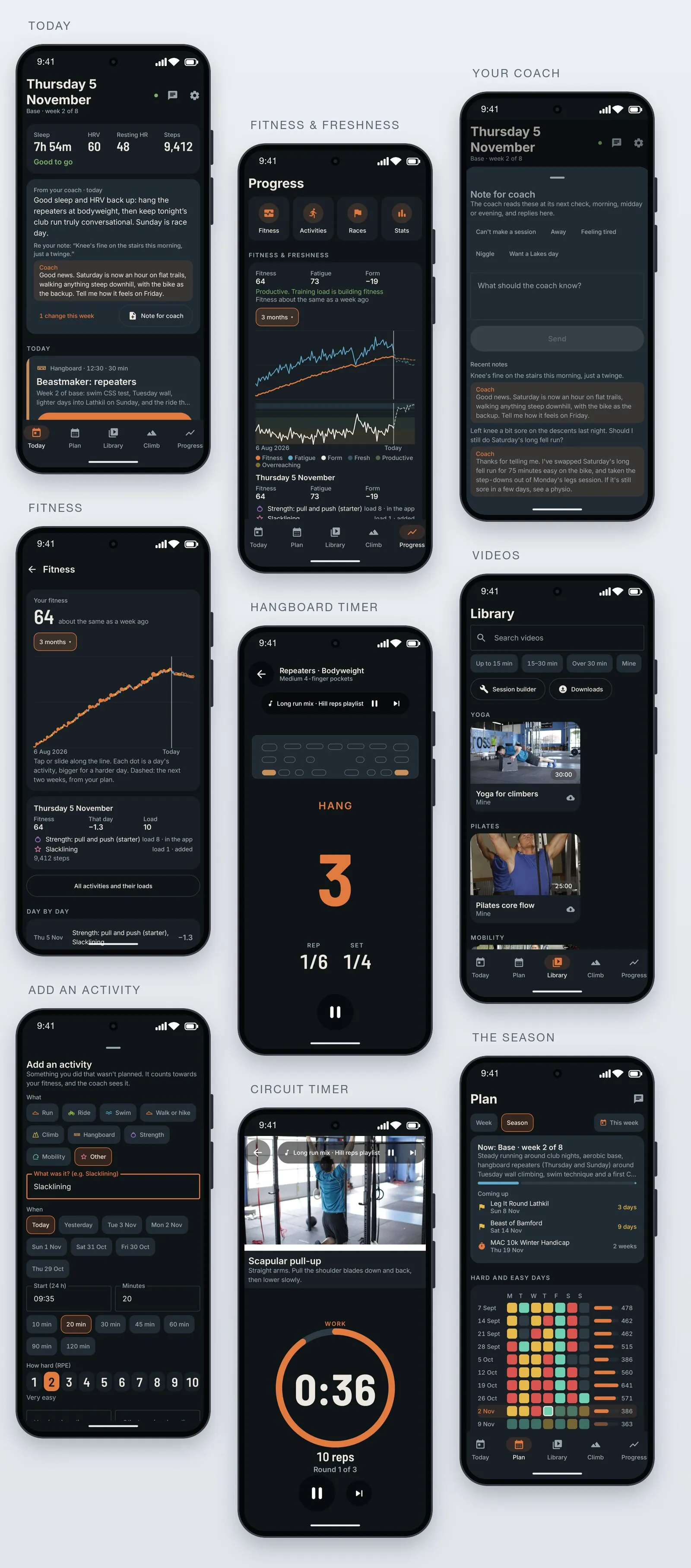
The Training app on the phone, nine screens: Today with sleep, HRV, steps and the coach’s reply to a note; Fitness & freshness; a conversation with the coach; the fitness graph; the hangboard timer; the video library; Add an activity; a circuit timer; and the season with its hard and easy days
App & Plugin Development

Training. An AI coach that keeps the plan on track

A fully personalised Android app and web dashboard, built for one athlete’s season, with Claude as the coach. No subscription: free to run.

Customised to you
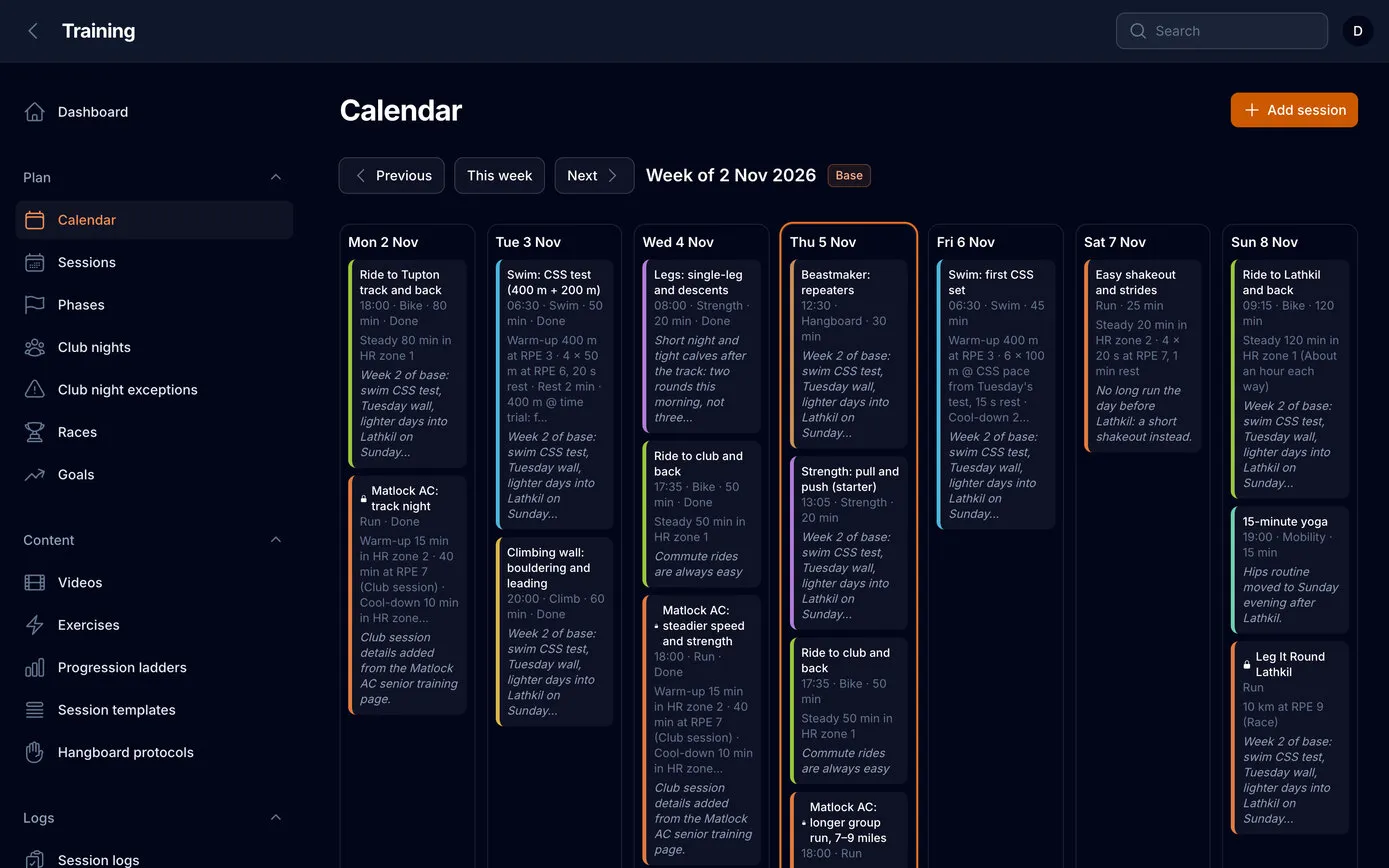
The week’s calendar on the web dashboard: seven columns from Monday to Sunday, each session a coloured card with its time, the set and the coach’s reason, today outlined in orange
Animation: the app’s Today screen scrolling: the hangboard session with a Start button, slacklining added and ticked, the rest of the day and Add an activity, then back up to sleep, HRV and steps, “Good to go”, and the coach’s message and reply

Training – Android app, web dashboard and AI coach

Three times a day the coach reads the training, the sleep, the steps and the Garmin data, and keeps a season of sessions on track within rules it can’t break. Every activity, planned or not, feeds a Strava-style fitness and freshness model.

  • 23Tools the coach can use, from reading the week to rewriting it
  • 380+Sessions planned, day by day, to the A race in July 2027
  • 89Exercises built in, with coaching cues
  • 42Days behind the fitness score, 7 behind fatigue, as Strava and TrainingPeaks count them
  • Android app
  • Web dashboard
  • AI coach
  • Garmin
  • Fitness and freshness
  • Works offline
01

Four goals, one season

Training is our own app, built for one athlete: our founder, who runs with Matlock Athletic Club, climbs, swims and rides in the Peak District, and has four goals in one season. Each needs different training, and a busy week can throw all of them out at once.

So the app holds the whole season, from the first week of base training to the A race on 17 July 2027, around the club’s weekly runs and its monthly 10k handicap. It shows exactly what to do today, and why.

  1. 10k in 45:00

    By April 2027, using the club’s monthly handicap race as the test.

  2. A 7a redpoint

    A sport climb at French grade 7a by April, with two hangboard sessions a week.

  3. 400 m in 6:00

    A pool time trial by June, built from swim speed tests every six weeks.

  4. Pinnacle Ridge Extreme

    28 km and 2,700 m of climbing around Helvellyn, with real scrambling, on 17 July.

Today
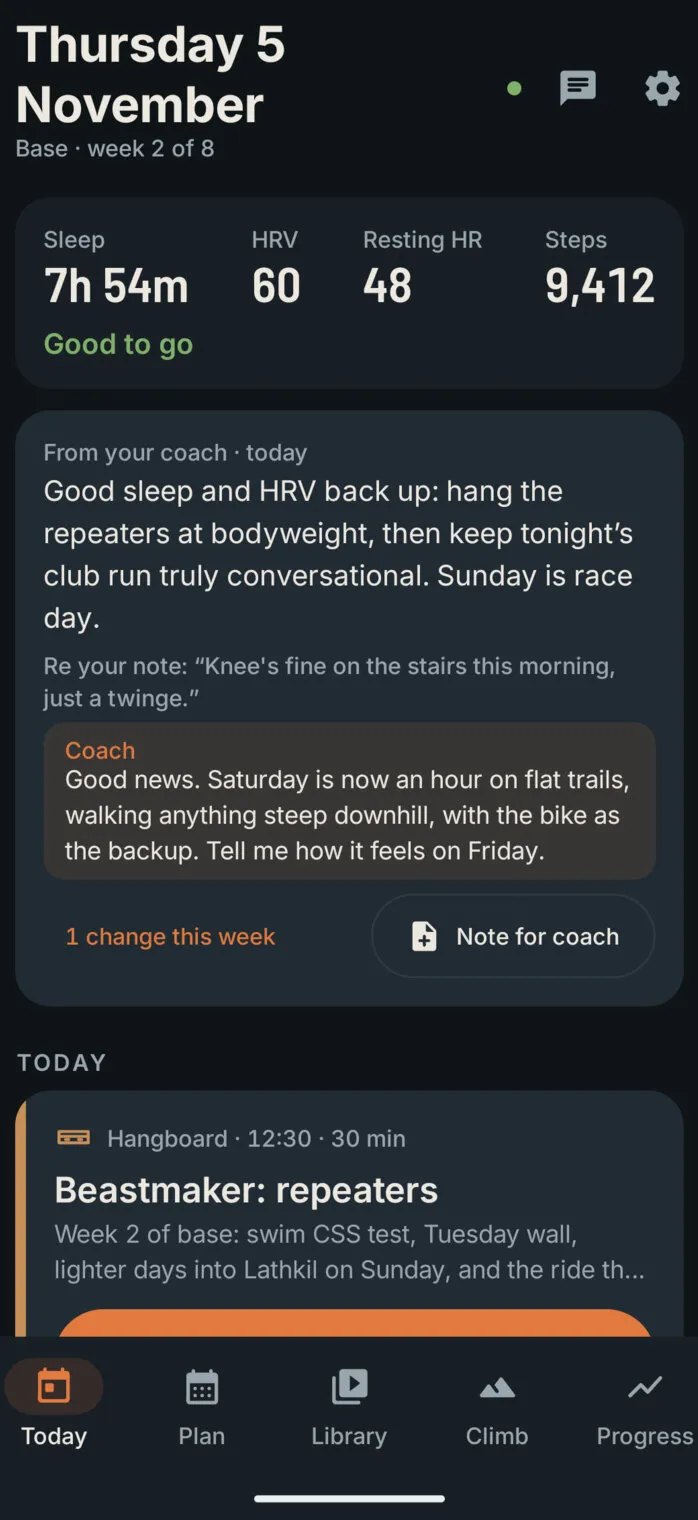
The Today screen: Thursday 5 November, Base, week 2 of 8; sleep 7 h 54 m, HRV 60, resting heart rate 48 and 9,412 steps, “Good to go”; the coach’s message for today, and its reply to a note about a knee

The rest of the day

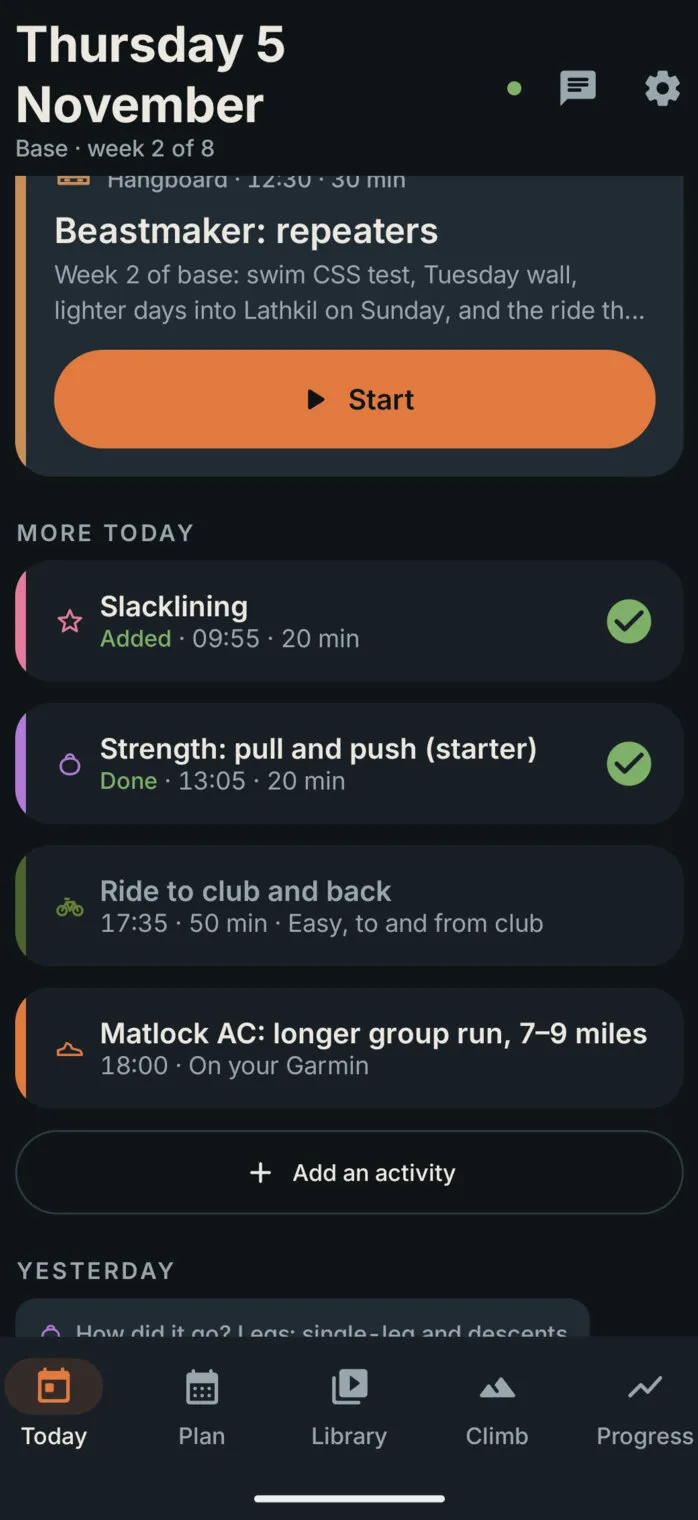
Further down Today: the hangboard session with a Start button, then More today: slacklining, added and ticked; a strength session, done; the ride to club; the club run on your Garmin; and an Add an activity button

Screens from a demo copy of the app: the coach’s real plan, with sample training history.

02

Fully personalised, and free

Training apps are built for millions of people, so they fit nobody exactly, and the good parts sit behind a monthly subscription. This one is built for one person. It knows the club’s nights and the handicap dates, the local fell races, the Beastmaker board on the wall, the pool’s lane times, the goals and the A race.

There’s no subscription and nothing to pay for. It isn’t a product for sale: it runs on a server we already had, the coach works inside our own Claude account, and the data comes from Garmin through intervals.icu. When something is missing, we add it, often the same day.

  • Shaped around one lifeClub nights, races, the climbing wall, the pool, a weekend away: the plan bends around them.
  • Free to runNo subscription, no adverts, no paid features. The app installs from our own dashboard.
  • Changed on requestEverything on this page, from the fitness charts to the Add button, was asked for in a sentence and built the same week.
03

Claude is the coach

The plan is AI-driven. Claude, Anthropic’s AI, coaches from our own Claude account, connected to the app as a custom connector. Through it, the coach reads everything that matters, the plan, what was done, how it felt, sleep, heart rate variability, steps, fitness and fatigue, and the Garmin activities, and it can write the plan.

It checks in three times a day, at 07:41, 12:41 and 19:41. After a poor night, a niggle in a check-in or a missed session, it adjusts the next days; otherwise it changes nothing. In the morning it leaves a sentence or two for the day at the top of Today, and it answers every note sent from the app, under the note itself. On Sunday evenings it writes the next week in full and outlines the two after. Every change arrives with a reason, and every one can be undone.

The coach’s checks run as scheduled tasks in Claude’s cloud, and the server does the rest, so nothing depends on a computer being switched on.

Garmin watch sessions, sleep, HRV intervals.icu every 30 minutes Training the plan, the logs and the guardrails Claude, the coach reads, plans, explains The phone today, timers, offline workouts to the watch guardrails

How it fits together. The app itself makes no AI calls and holds no AI keys: the coach comes to the app.

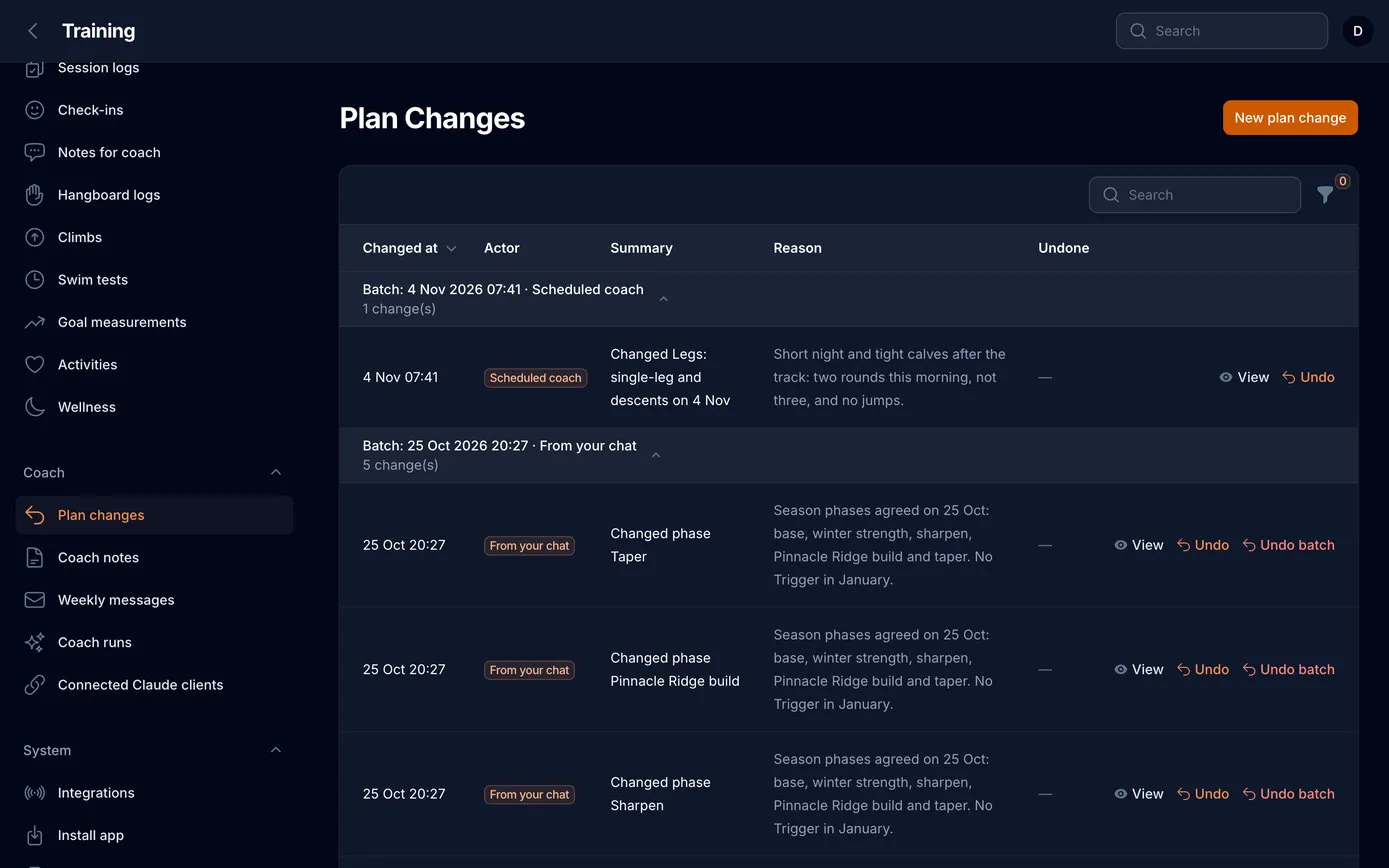
Plan changes on the web dashboard, in batches: the morning check’s change to a legs session, then the season’s phases agreed in a chat, each with its summary, the coach’s reason, and buttons to view, undo or undo the whole batch
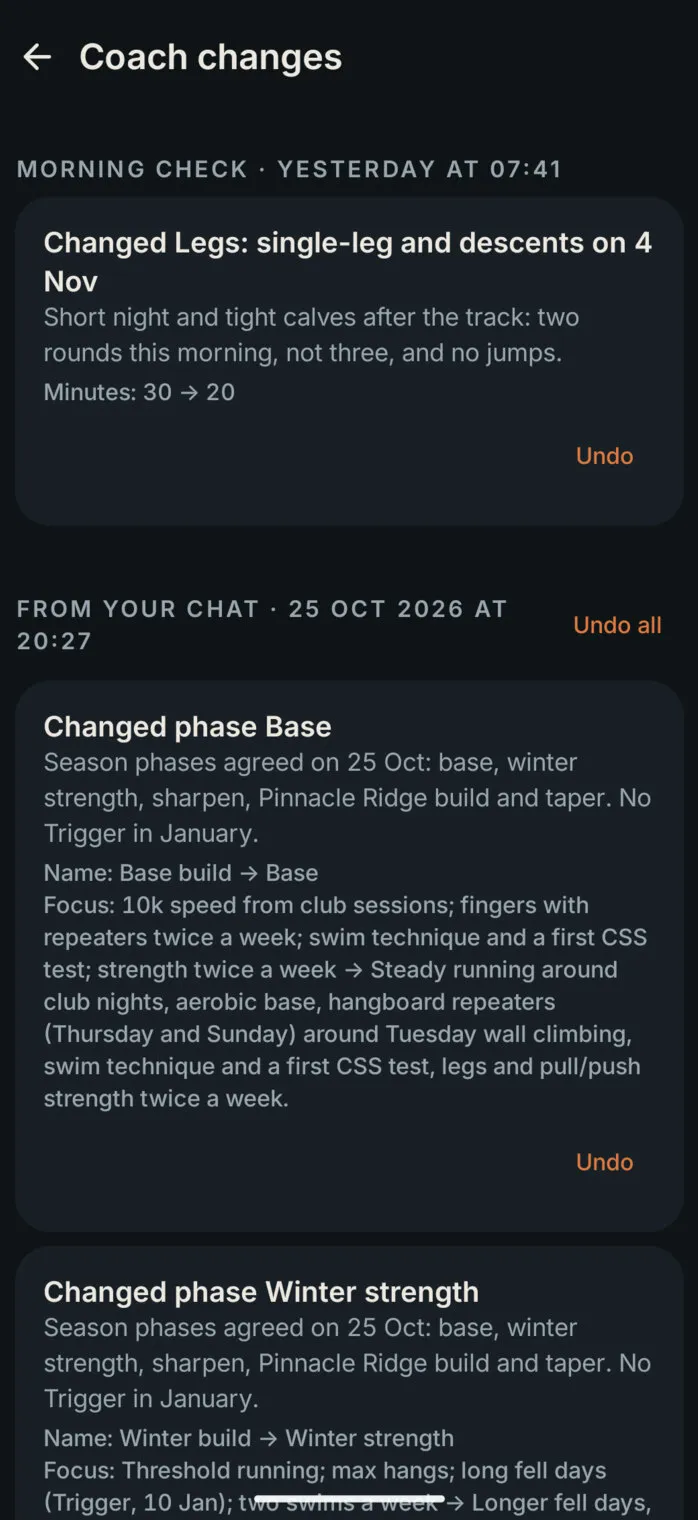
Coach changes in the app: “Morning check, yesterday at 07:41: Changed Legs: single-leg and descents. Short night and tight calves after the track: two rounds this morning, not three, and no jumps. Minutes 30 → 20”, with Undo

What changed, and why

The coach’s changes on the web and on the phone, grouped by when they were made, each one with its reason and an Undo button.

  • AI coach
  • Undo

A Sunday’s planning, in the coach’s own tools

get_overview Base, week 2 · readiness · fitness 64, form −19 · notes
get_guardrails the rules it can’t break, and the ones it must explain
get_plan the next three weeks
set_sessions 14 changes · 3 warnings, each accepted with a reason
mark_notes_read one reply: “Saturday is now an hour on flat trails”
set_weekly_message “A lighter week with a race at the end of it.”
04

Message your coach

It’s like having a direct line to a coach. A note from Today, in your own words, a niggle, a session you can’t make, a weekend away, a question, reaches the coach at its next check, morning, midday and evening, three times a day.

The coach acts on it within the rules, changes the plan if it needs to, with a reason, and replies in a sentence or two. The reply sits under the note and at the top of Today, so the conversation carries on through the week.

  1. You · Wednesday 19:12

    Left knee’s a bit sore on the descents from last night’s run. Should I still do Saturday’s long fell run?

  2. Coach · Wednesday 19:41

    Thanks for telling me. Pain is a stop sign, so I’ve swapped Saturday’s long fell run for 75 minutes easy on the bike, and taken the step-downs out of Monday’s legs session. If it’s still sore in a few days, see a physio.

  3. You · Thursday 08:05

    Knee’s fine on the stairs this morning, just a twinge.

  4. Coach · Thursday 12:41

    Good news. Saturday is now an hour on flat trails, walking anything steep downhill, with the bike as the backup. Tell me how it feels on Friday.

  5. You · Friday 07:20

    Felt fine on a walk last night. Happy with the flat hour.

  6. Coach · Friday 07:41

    Then the flat hour stays: easy pace, short steps on anything downhill, and stop if the knee complains. Next week builds back towards the fell run.

A sample conversation, written for this page. In the app, each reply appears under its note and at the top of Today.

Note for coach
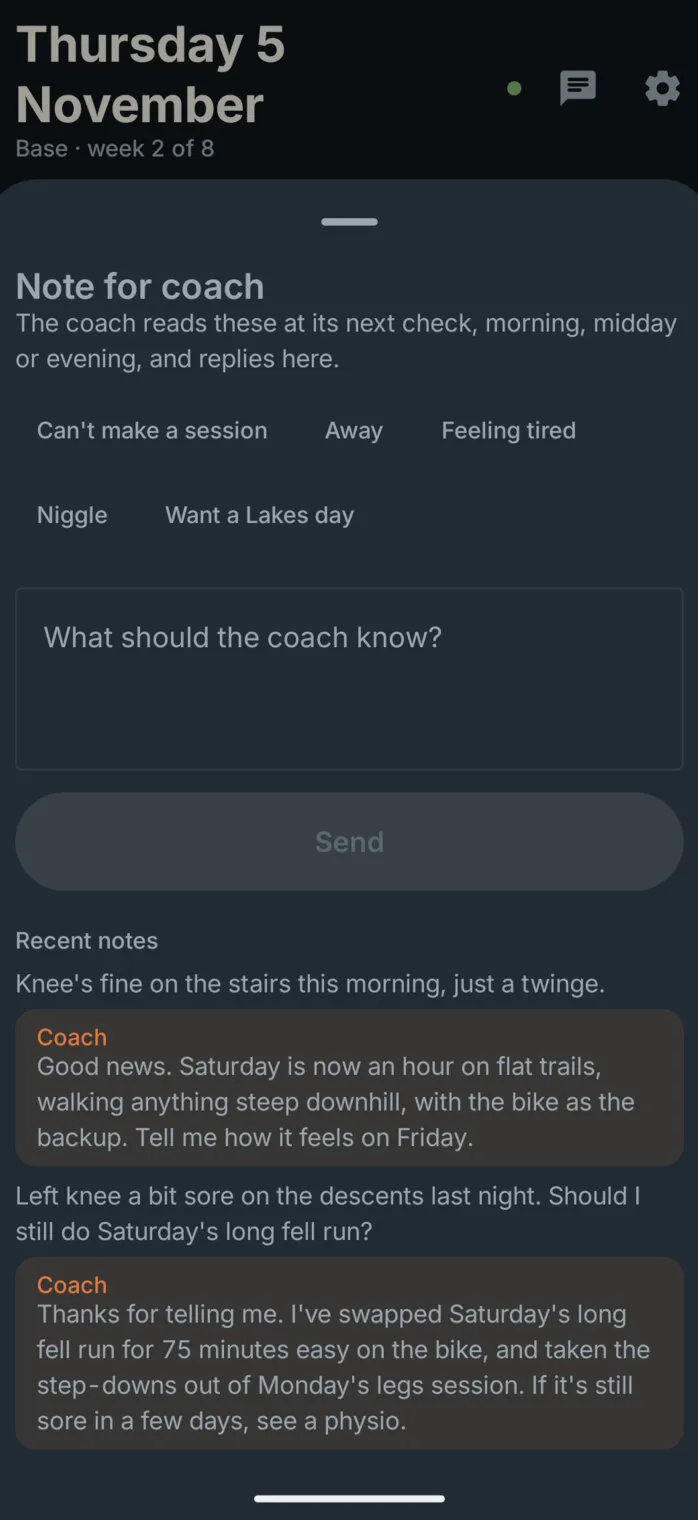
The Note for coach sheet: quick chips such as Can’t make a session, Away, Feeling tired and Niggle, a box for the note, and the recent notes with the coach’s replies under them
05

Rules the coach can’t break

An AI coach is only useful if it can be trusted with the plan, so the app checks every change before it’s saved, and sends the coach the fitness and form figures to plan with. Some rules are absolute. Others are warnings: the coach either adjusts the plan or accepts the warning with a reason, which is shown with the change.

  • Races stay put. Club nights are the backbone of the week but aren’t fixed: when one can’t be made, the coach moves it, swaps it for a solo session or drops it, and says why.
  • The past is left alone. No changes to earlier days, logs, activities or sleep data.
  • No sessions between 22:00 and 05:30, and no more than two key sessions in a day.
  • Warnings to answer: a week more than 10% bigger than the last three, no lighter week in four, more than three hard days, hard fingers the day before a race or a redpoint, a key session the day after a race, a hard session when readiness says ease off, and no taper before a starred race.

A club night

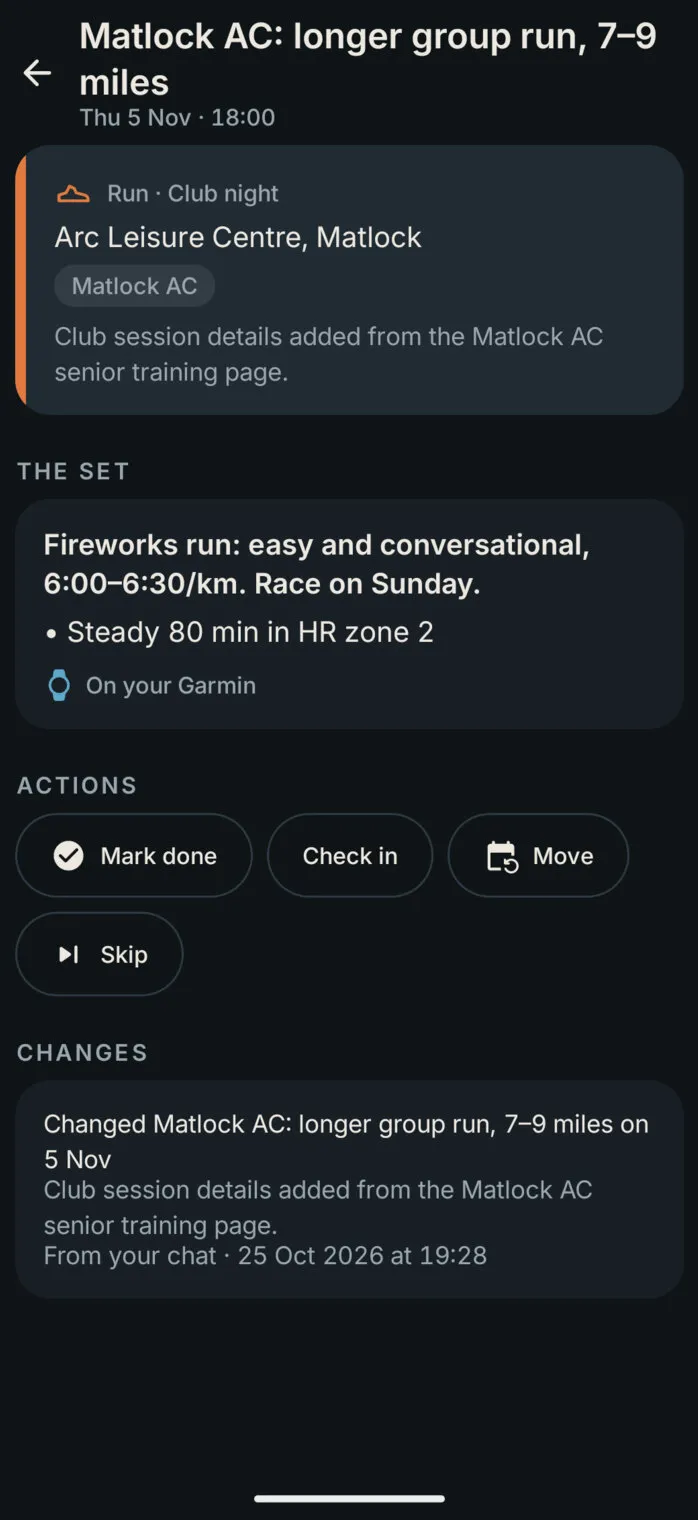
Tonight’s club run in the app: Matlock AC, fixed, at the Arc Leisure Centre; the set “Fireworks run: easy and conversational, 6:00–6:30/km. Race on Sunday”, steady 80 minutes in heart-rate zone 2, on your Garmin

A coach’s session

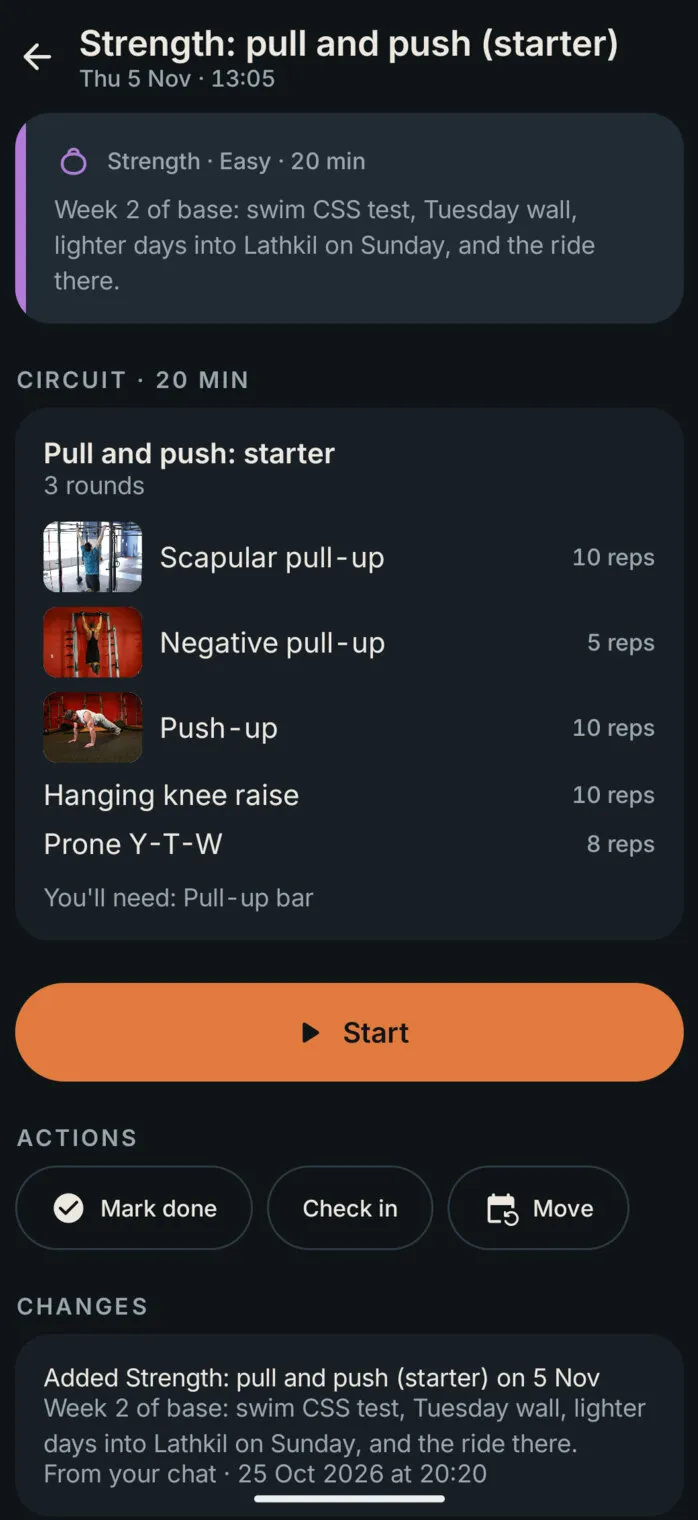
A strength session the coach added: Pull and push, three rounds of scapular pull-ups, negative pull-ups, push-ups, hanging knee raises and prone Y-T-W, with exercise photos and a Start button, and the change that added it
06

Connected to Garmin

The Garmin watch does the recording; the app does the joining up. Through intervals.icu, every 30 minutes, each finished run, ride, swim and climb comes in and ticks off its session, with the night’s sleep, heart rate variability and resting heart rate.

From those the app works out each morning’s readiness, good to go, keep an eye on it, or ease off, by comparing the night with the last four weeks. And it works the other way too: the next fourteen days of structured runs, rides and pool sets go to the Garmin calendar, and on to the watch, with every step, pace and heart-rate target.

The daily step count comes through too. Under 1,000 steps the watch can’t have been worn, so the day is ignored rather than read as a rest day; above that, a big day on foot is something the coach takes into account. Once a week the app reads the whole history again, so anything imported later still reaches the fitness charts.

The coach can also read Strava in a chat, through Strava’s own connector. The app never stores Strava data: its long-term record comes from Garmin and its own logs.
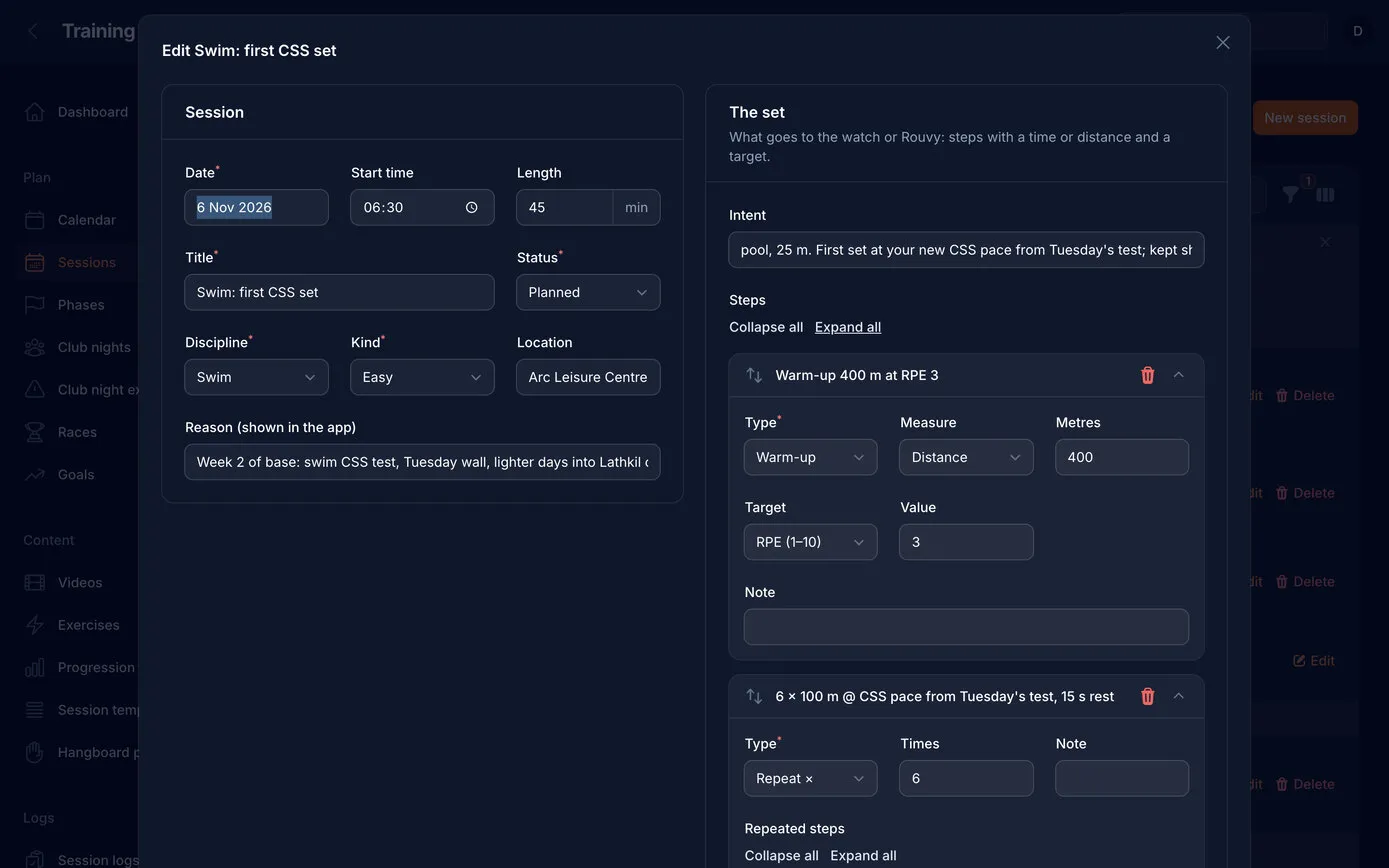
Editing a pool session on the web: date, time, length and the coach’s reason on the left; on the right the set that goes to the watch, a 400 m warm-up at effort 3, six 100 m repeats at swim-speed pace with 15 seconds’ rest, and a 200 m cool-down, each step with its type, distance and target
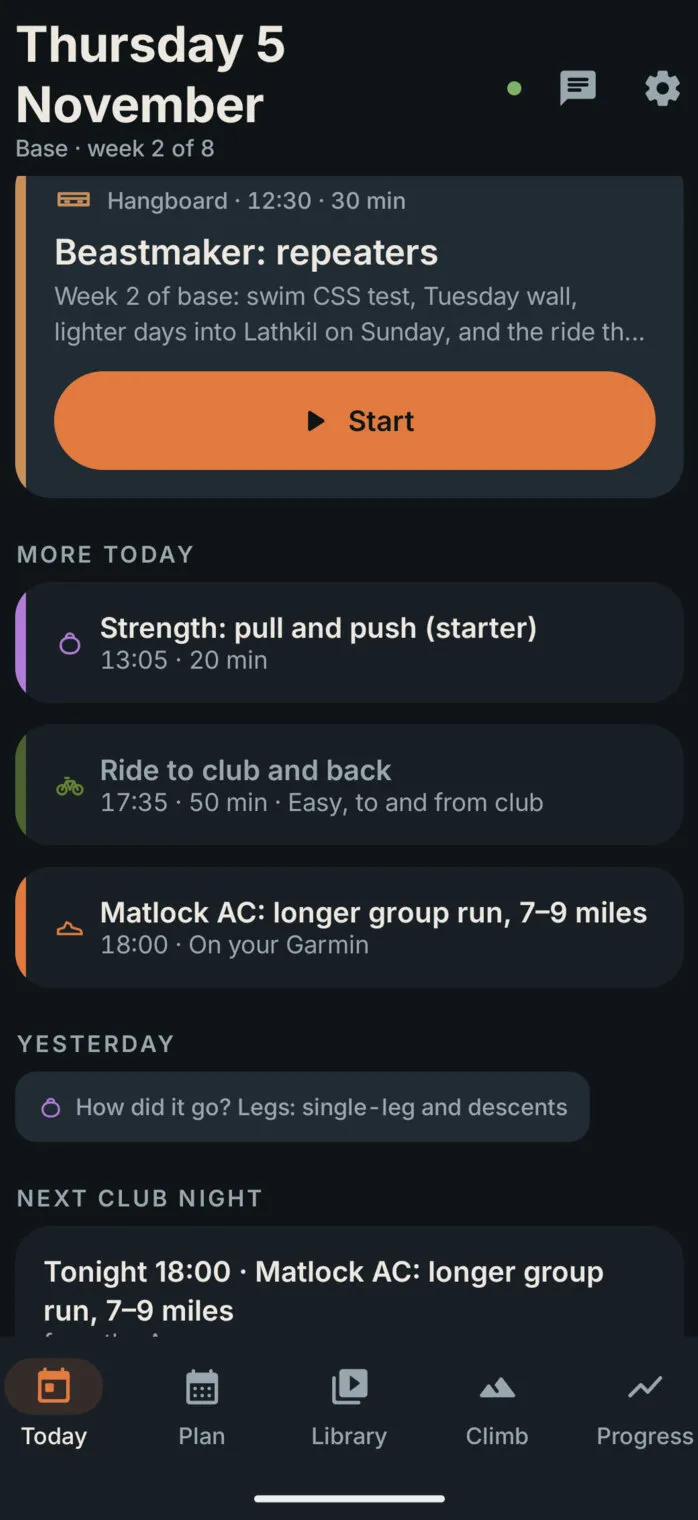
The rest of today in the app: a strength session, the easy ride to club and back, and the club’s longer group run, marked “On your Garmin”

From the plan to the watch

A pool set is written once, as steps with distances and targets, and goes to the watch for a 25 m pool. The phone stays in the locker.

  • Garmin
  • intervals.icu
07

Anything unplanned counts

Real weeks have things in them that no plan predicted: twenty minutes on a slackline, a long walk, an evening at the wall with friends. They’re training too, so they count.

Add an activity, on Today or on any of the last seven days in the week, takes a few taps: the sport, or a name for anything else, the day, the time, how long, and how hard it felt out of ten, with distance and climb if you like. It’s ticked off straight away, it goes into fitness and fatigue, and the coach sees it at its next check.

Anything the watch records without a session planned shows up by itself, marked From Garmin. If it was added by hand as well, the two join up rather than counting twice.

Add an activity
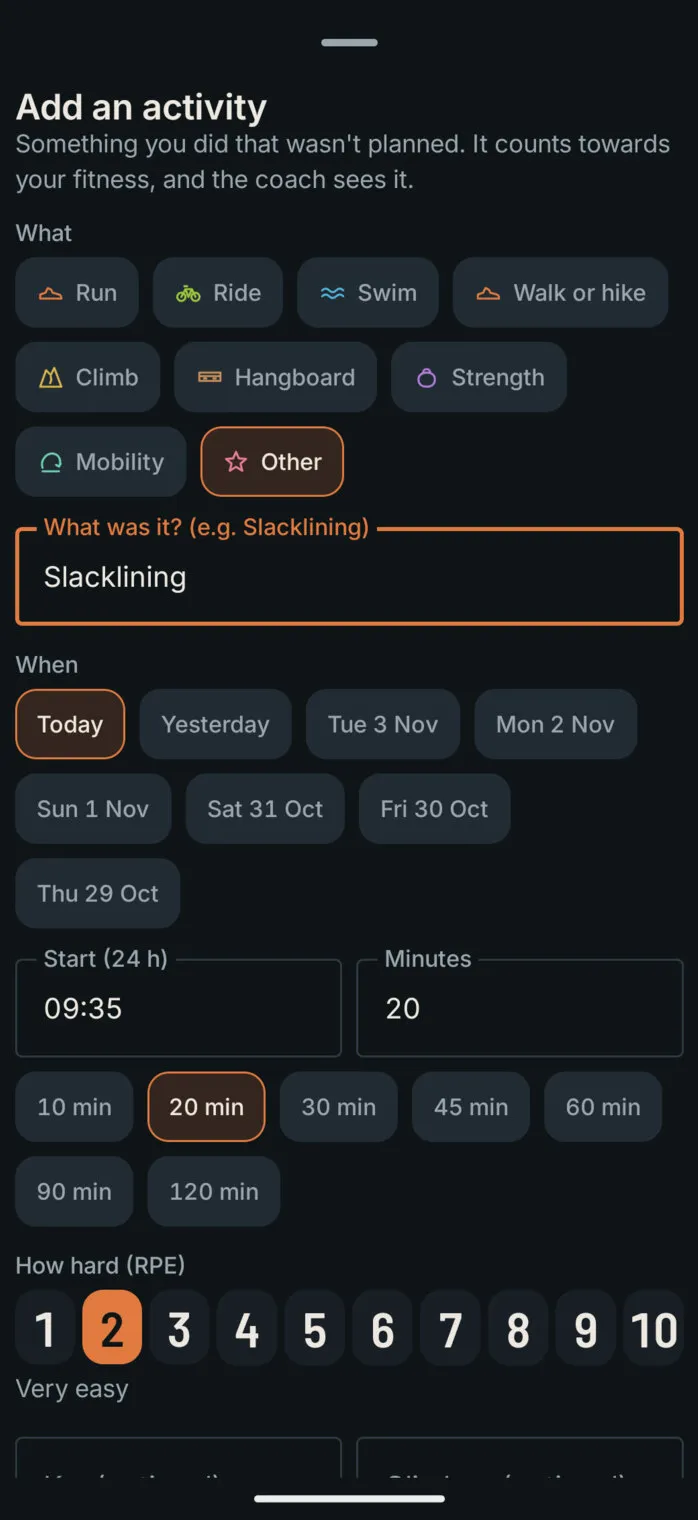
The Add an activity sheet: sports from run to mobility, Other chosen and named Slacklining, today picked from the last eight days, a start time of 09:35, 20 minutes, and effort 2 out of 10, very easy

In the week

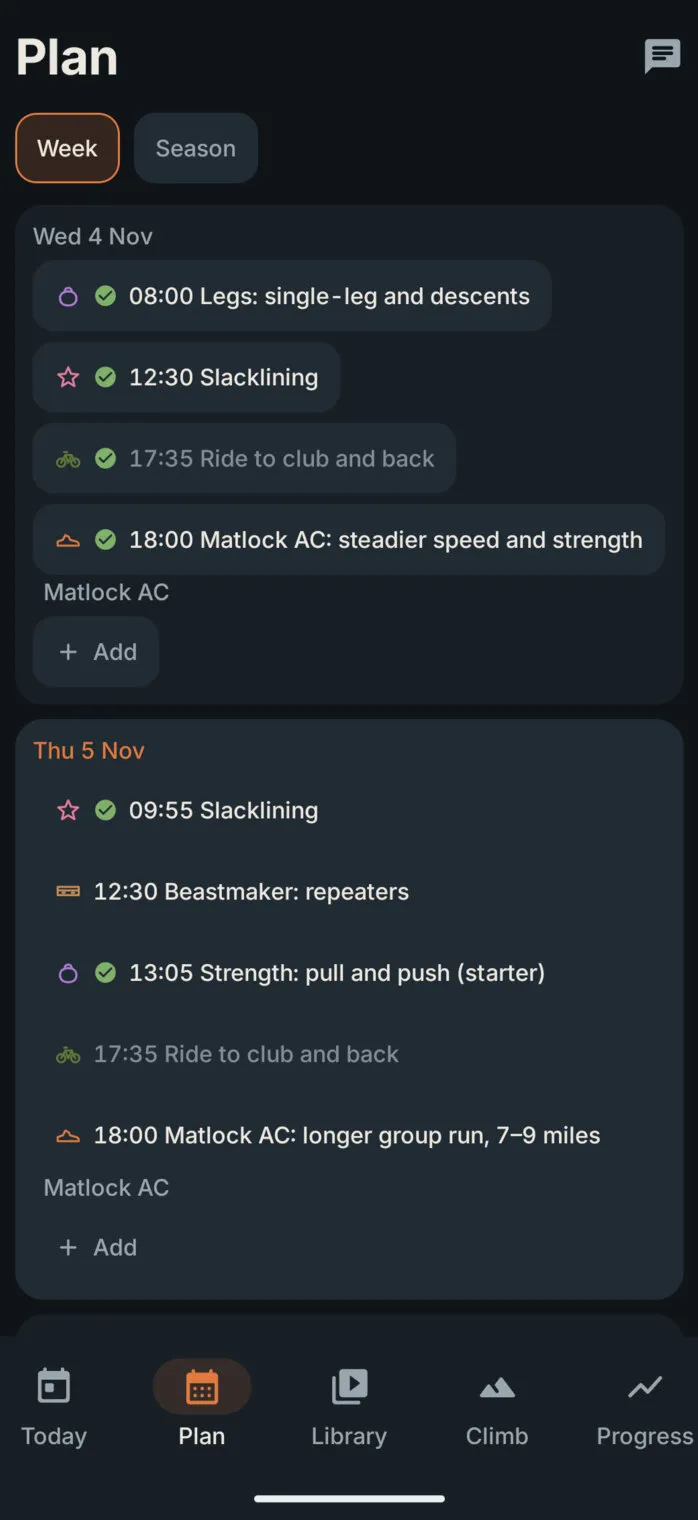
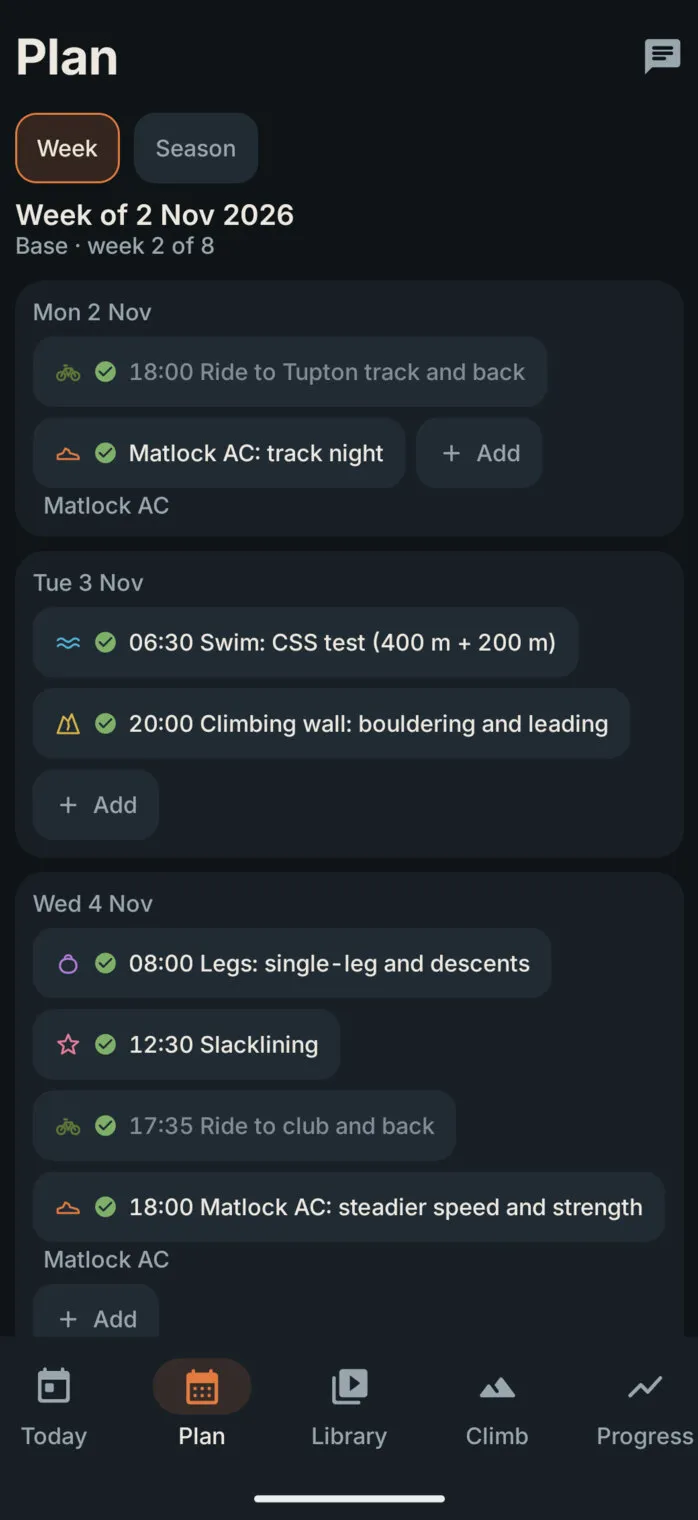
The Plan week for Wednesday and Thursday: slacklining sits among the planned sessions with a tick, and each recent day has an Add button
08

Fitness, fatigue and form

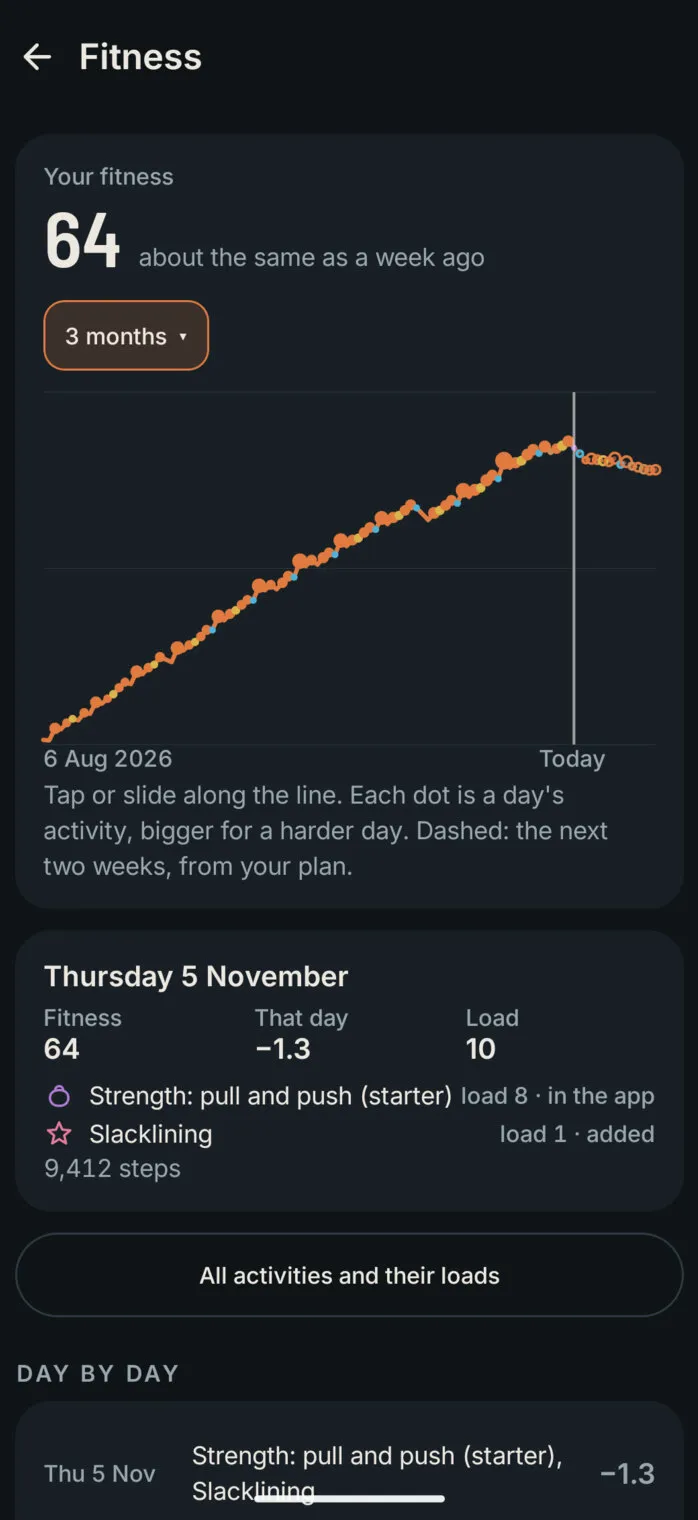
Strava’s Fitness & Freshness and TrainingPeaks’ performance chart answer the same question: how fit are you, how tired, and are you fresh enough to race? Both use a model sports scientists have used for decades, the impulse-response model. Strava doesn’t publish its exact numbers, so the app uses the published TrainingPeaks and intervals.icu settings, and works it out from every activity, planned or not.

It starts with a load score for each activity, then adds up each day.

  1. Load

    Each activity scores its heart-rate load from the watch. With no heart rate, intervals.icu’s load from power or pace. With neither, an estimate: hours × (effort ÷ 10)² × 100, so an hour at 7 out of 10 scores 49.

  2. Fitness

    A 42-day average of daily load, weighted towards recent days. Each day it moves a 42nd of the way towards that day’s load: an activity adds points, a day off loses a few.

  3. Fatigue

    The same over seven days, so it jumps after a hard week and drops in a few days of rest.

  4. Form

    Yesterday’s fitness minus yesterday’s fatigue. Negative while training is building, positive when fresh.

Freshness
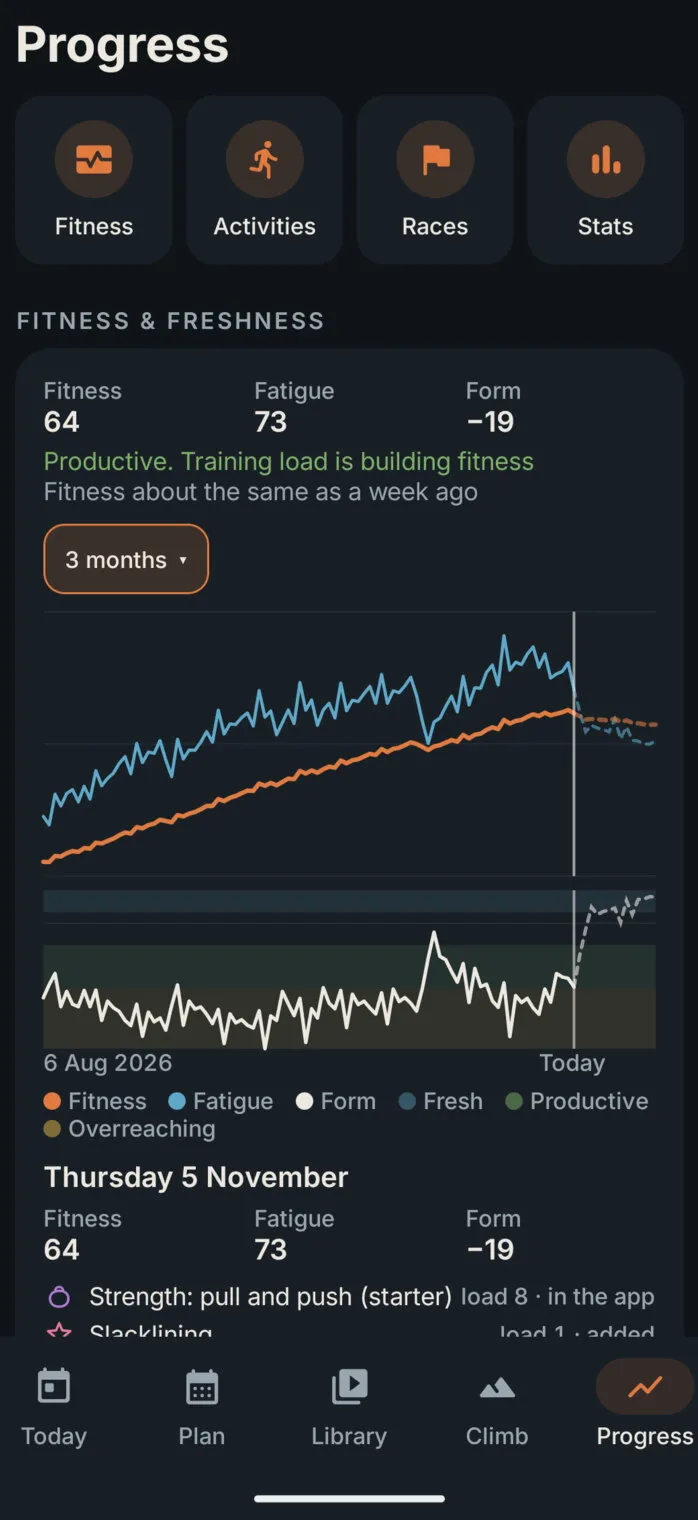
Progress opens with buttons for Fitness, Activities, Races and Stats, then the Fitness & freshness card: fitness 64, fatigue 73, form −19, “Productive. Training load is building fitness”, the fitness and fatigue lines over three months, form underneath with its bands shaded, and the selected day’s activities

Fitness

The Fitness screen: “Your fitness 64”, a range menu set to 3 months, one rising line with a dot for each day’s activity, bigger for harder days, and a dashed look-ahead after today; below, Thursday 5 November: fitness 64, −1.3 that day, load 10, with the day’s two activities

Day by day

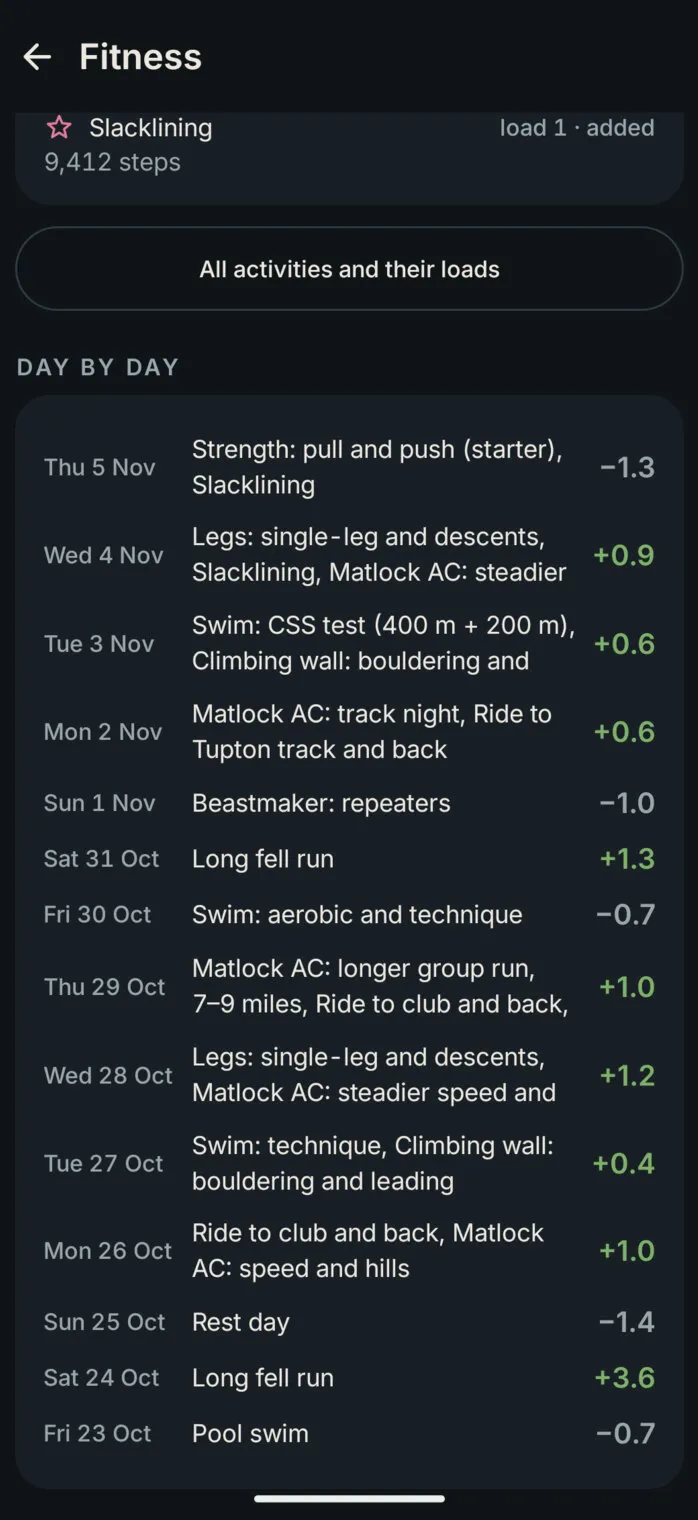
Day by day on the Fitness screen: each day’s activities and the points they added or took away, +3.6 for a long fell run, −1.4 for a rest day, +1.0 for a club run and a ride
  • Form, in words. As a share of fitness, so the bands grow with you: fresh above +5%, productive from −10% to −30% (training is building fitness), overreaching below −30% (time for easier days), and neutral in between.
  • The next two weeks, dashed. The plan’s sessions are scored ahead of time, so the charts show where fitness and form are heading, and the coach checks it before adding more.
  • From a month to all time. Pick 1, 3 or 6 months, 1, 2 or 3 years, or everything since the first activity. Tap or slide along a chart to see any day.
  • Relative to you. The score is on its own scale: compare it with your own past, never with Strava’s numbers or anyone else’s.
09

Every activity, with its score

The Activities list holds everything that counted towards fitness, month by month: watch activities, sessions done in the app and anything added by hand. Each one shows its time, distance and climb, its load score, and where the score came from, heart rate, intervals.icu, how it felt, or an estimate.

Each month shows how many activities it had and their total load, chips filter by sport, and tapping an activity explains how its score was worked out.

Activities
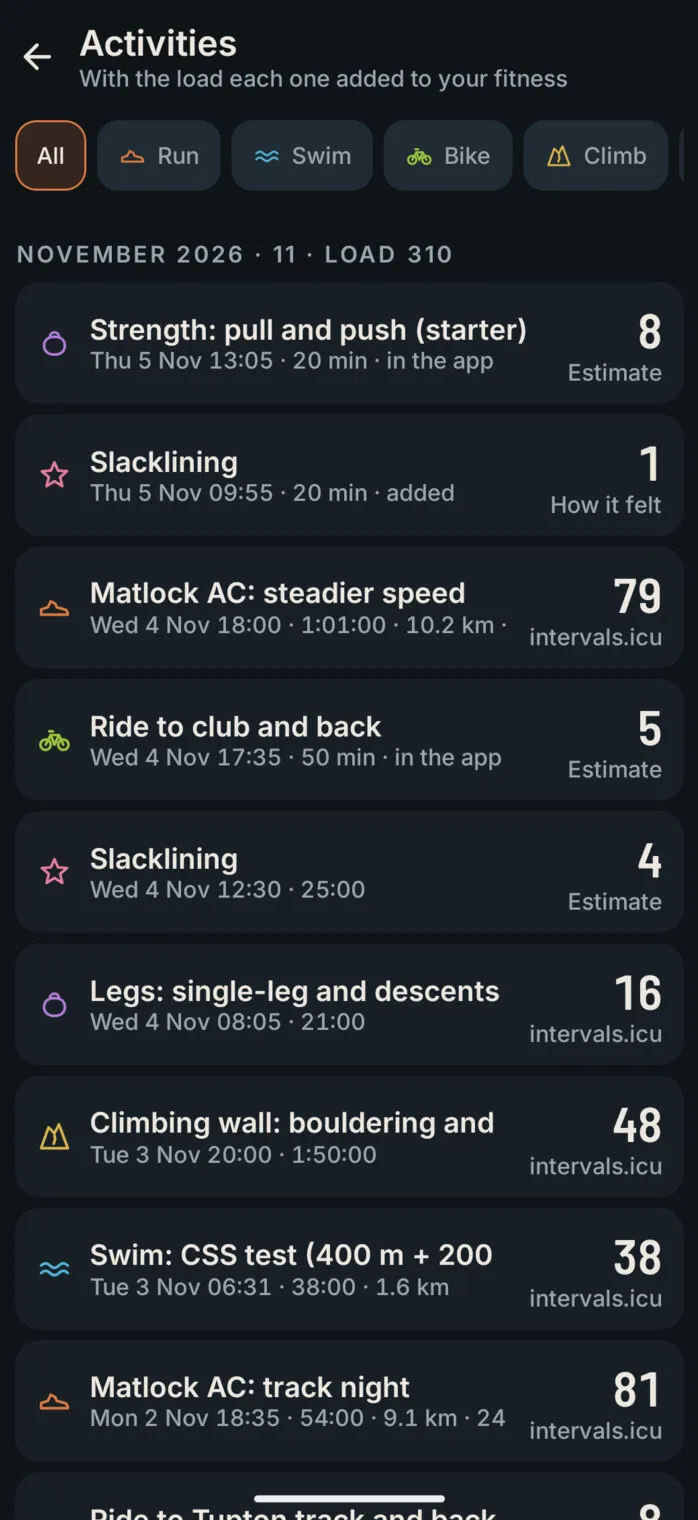
The Activities list for November 2026, eleven activities with a total load of 310: a strength session in the app, slacklining added by hand, the club’s steadier speed session with 79 from intervals.icu, the ride to club, a climbing wall session, a swim speed test and the track night, each with its load and where it came from

One activity

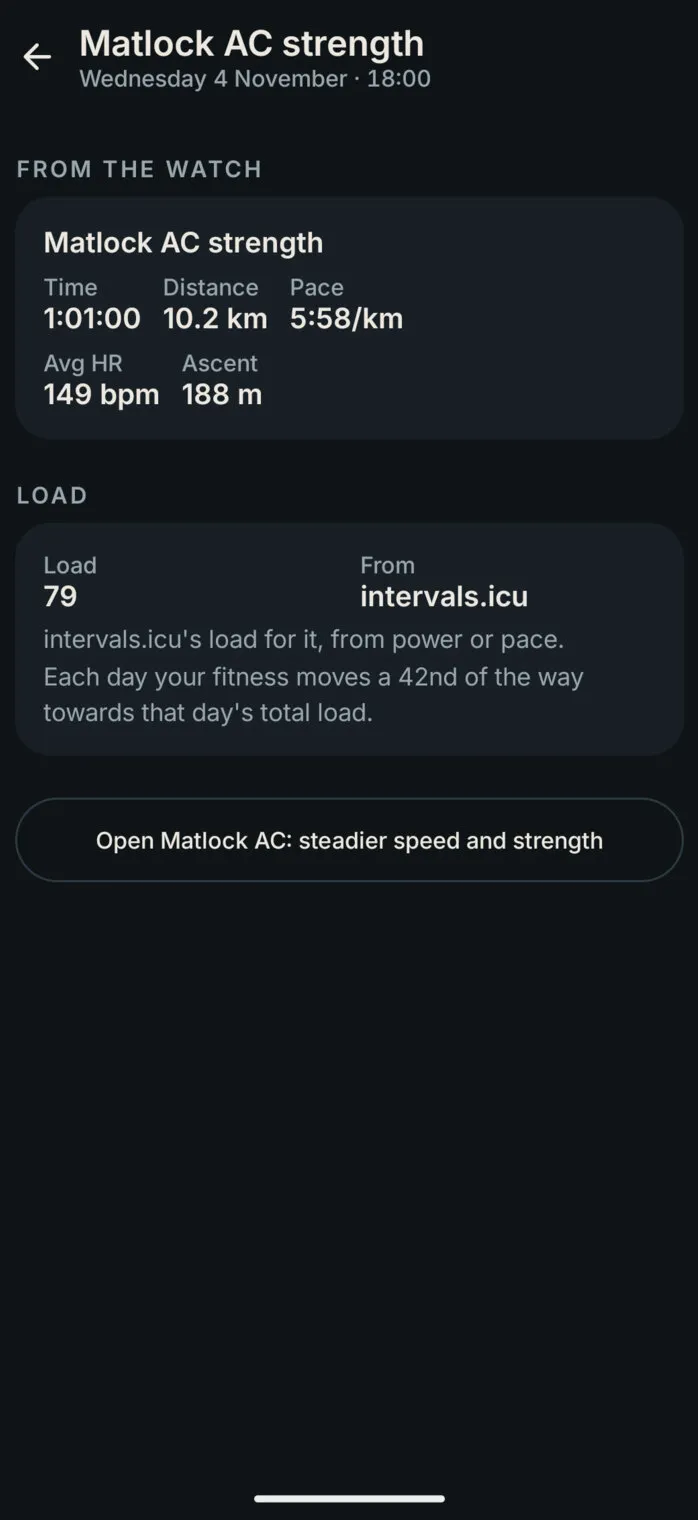
One club run from the watch: an hour, 10.2 km at 5:58/km, average heart rate 149 and 188 m of ascent; its load of 79 from intervals.icu, explained, and a button to open the planned session it matched
10

The season at a glance

The Plan tab has two views. The week shows each day’s sessions, which can be dragged to another day, with a This week button to jump back from anywhere. The season shows the bigger picture.

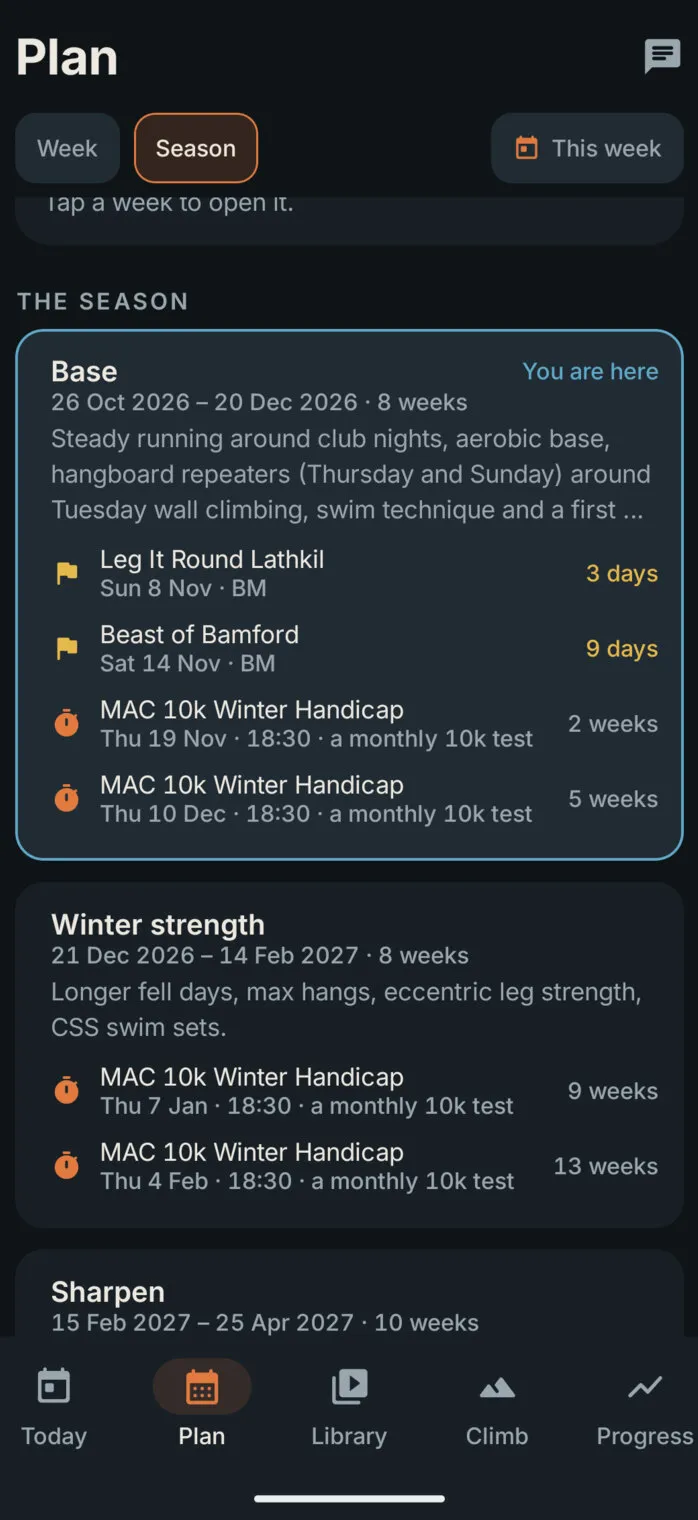
It opens on where you are, the phase and the week, with the next races, handicaps and goal deadlines counting down. Then come the hard and easy days, week by week, coloured against your own training, so the building weeks and the lighter weeks show at a glance, and the plan’s next two weeks show paler. Last comes each phase of the season, from Base to Recover, with its focus and its key dates.

Now
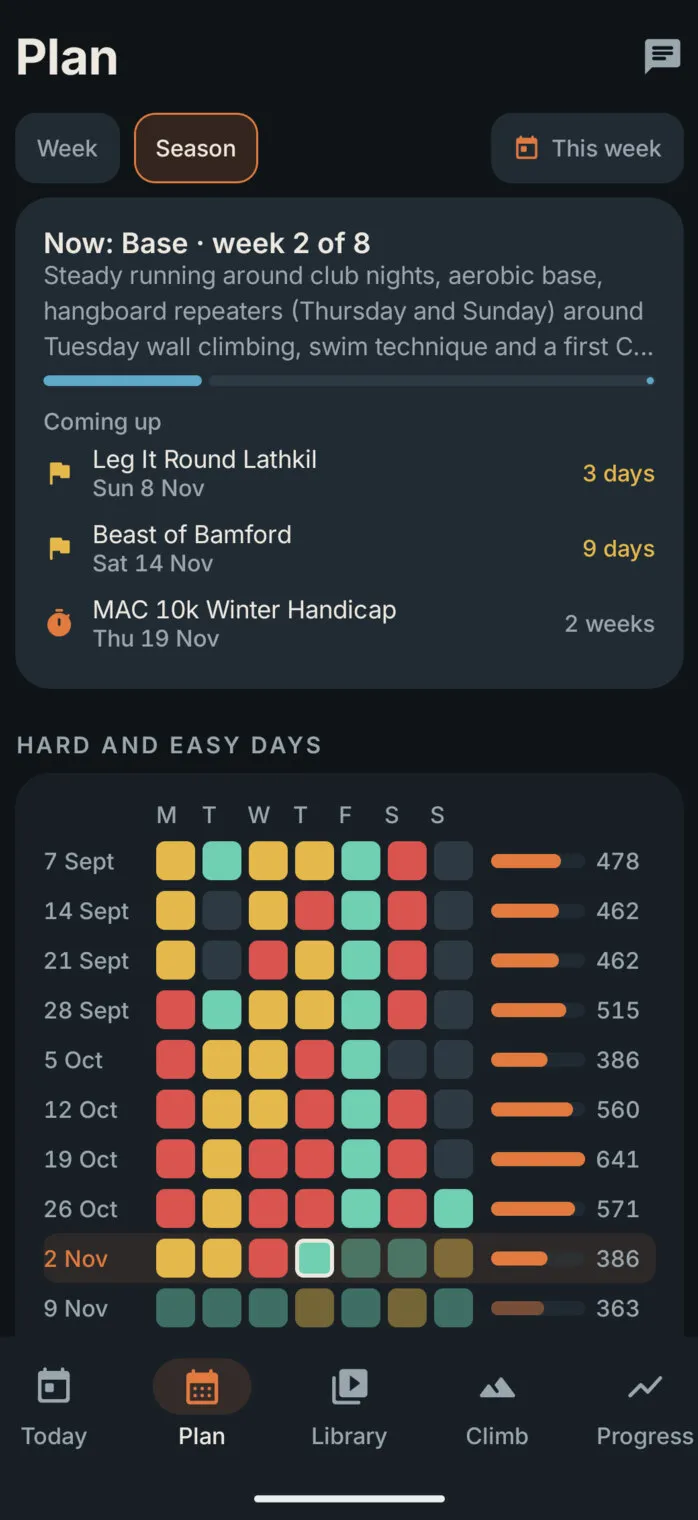
The Season view: “Now: Base, week 2 of 8” with its focus and a progress bar; coming up, two fell races in 3 and 9 days and the MAC 10k Winter Handicap in 2 weeks; then the hard and easy days, a row of seven coloured squares for each week since September, each with the week’s total load

Phases

The season’s phases: Base, marked You are here, with its races and handicaps; Winter strength with the January and February handicaps; and Sharpen
11

Sessions built in

Not everything happens on the watch. Strength, mobility and finger training run in the app itself, with big timers that can be read from two metres away and a screen that stays on.

The hangboard timer knows the Beastmaker 1000 board: pick a protocol and a hold, and it lights the hold, counts every hang and rest, and asks whether each set was completed. Circuits, EMOMs, AMRAPs and ladders show each exercise with photos of its start and finish positions and its coaching cues. When a session ends, it asks how hard it felt, out of ten. There are 89 exercises, 16 ready-made sessions and six progression ladders, from push-ups to one-arm push-ups, and the coach can build new sessions from them.

Hangboard
Animation: the hangboard timer for repeaters on the medium four-finger pockets, counting down Get ready, then Hang for seven seconds and Rest for three, rep by rep, with the hold lit on a drawing of the board

A circuit

Animation: a strength circuit: a photo of a scapular pull-up with its cues, and a ring timer counting down Get ready, then 40 seconds of work for 10 reps, round 1 of 3
  • Voice cues and beepsA voice counts you in and calls each exercise, so the screen can stay on the floor.
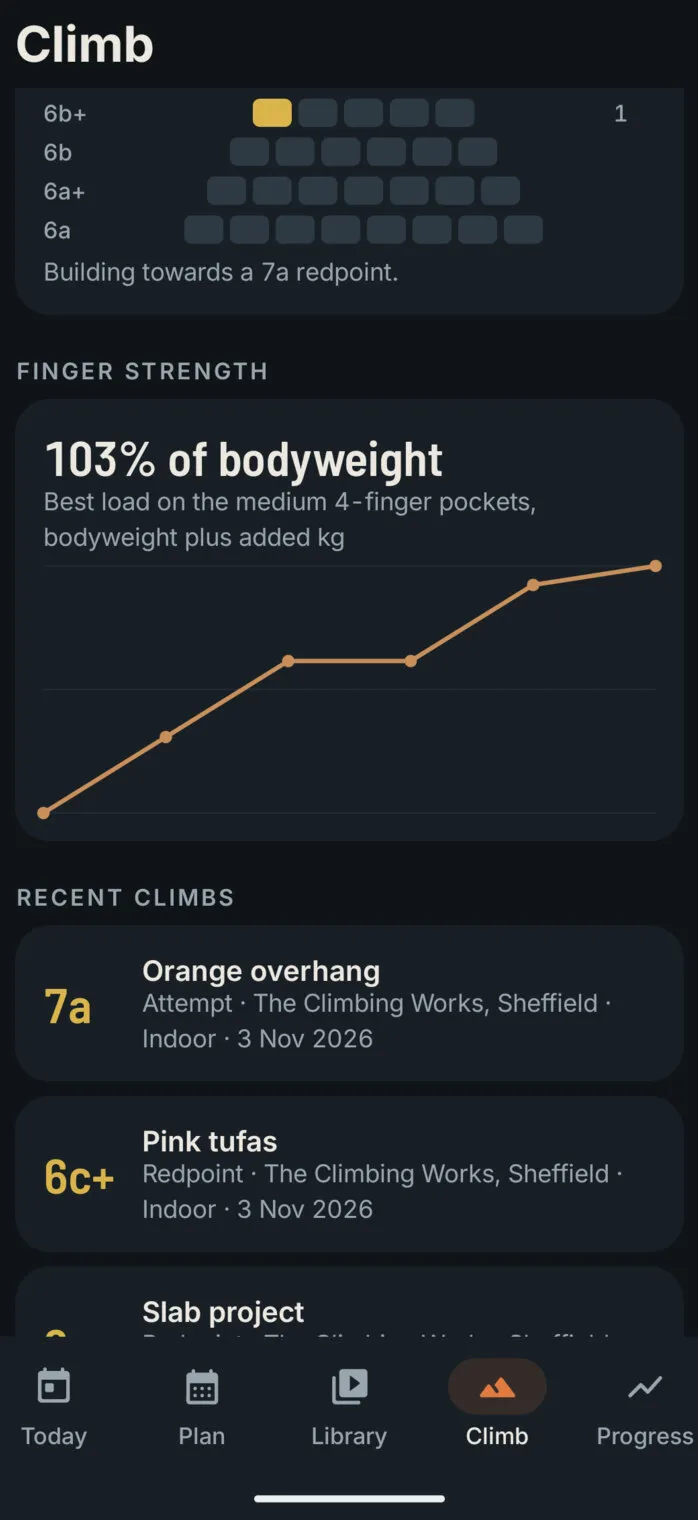
  • Finger strengthEvery hangboard set is logged, and the app charts the best load as a percentage of bodyweight.
  • Session builderPut together a session from the exercises in a few taps, and it runs like the built-in ones.
12

The music stays on

Training is better with music, so the app never stops it. Whatever is playing, Spotify or any other music app, shows on the timer screens with play, pause and skip, so there’s no leaving the session to change a track.

Voice cues and beeps dip the music for a moment rather than pausing it, and follow-along videos can play with their own sound, or muted under your own music with just the app’s voice cues.

Music on the timer
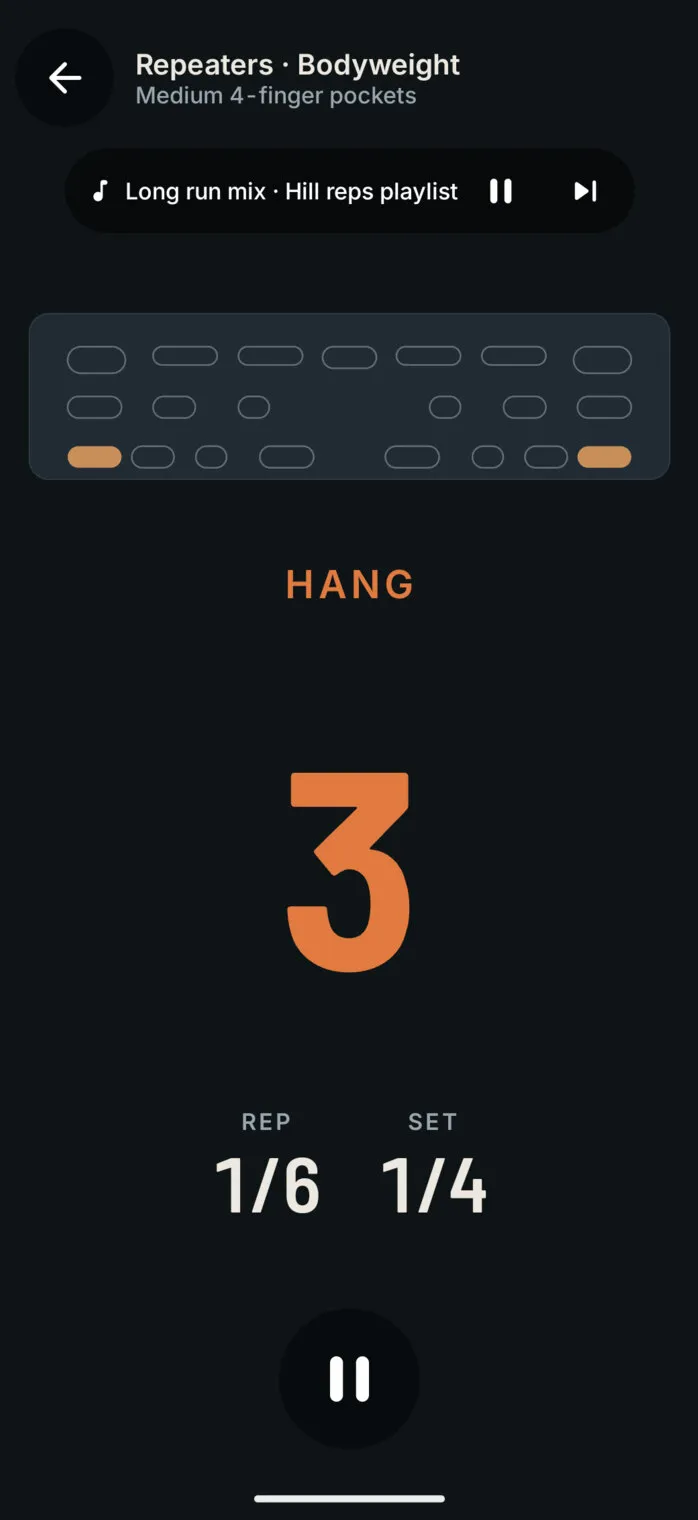
The hangboard timer mid-hang, with the music playing shown under the title: “Long run mix · Hill reps playlist”, with pause and skip buttons

Sound settings

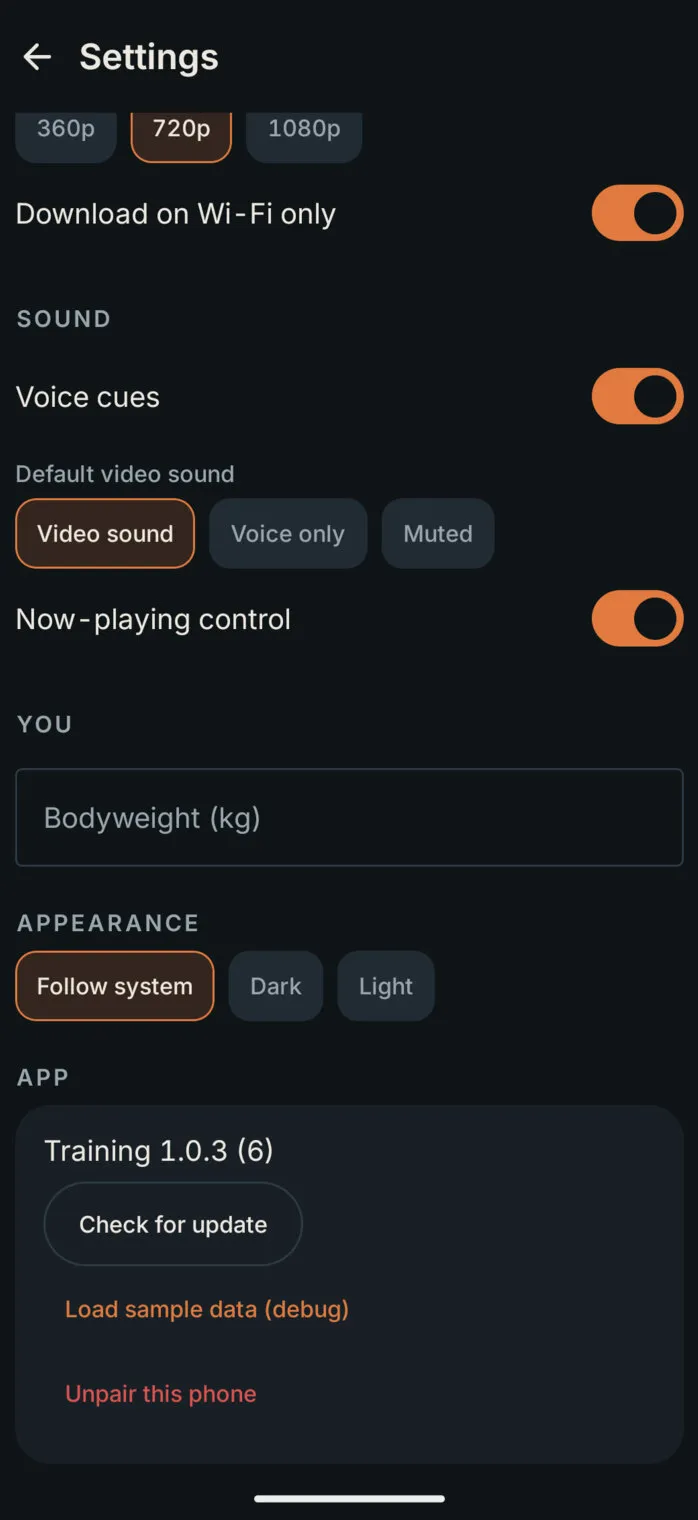
The app’s settings: download quality and Wi-Fi only, voice cues on, the default video sound (video sound, voice only or muted), the now-playing control, and light or dark appearance
13

Videos that work offline

Our own follow-along videos, yoga, Pilates, mobility and strength, stream from Bunny Stream, and new ones appear in the library every night. Any of them can be downloaded to the phone, in the size you choose and on Wi-Fi only if you like, so they play in a gym with no signal.

The coach picks from the library too, and attaches a video to a session: the hips routine on the evening after a long fell run, a forearm routine after the climbing wall. YouTube follow-alongs play in YouTube’s own player, and are never downloaded.

A ring fills on each video as it downloads, with its size in MB. A video can be taken off the phone, or out of the app altogether to keep the library tidy; it stays on the website, ready to put back.
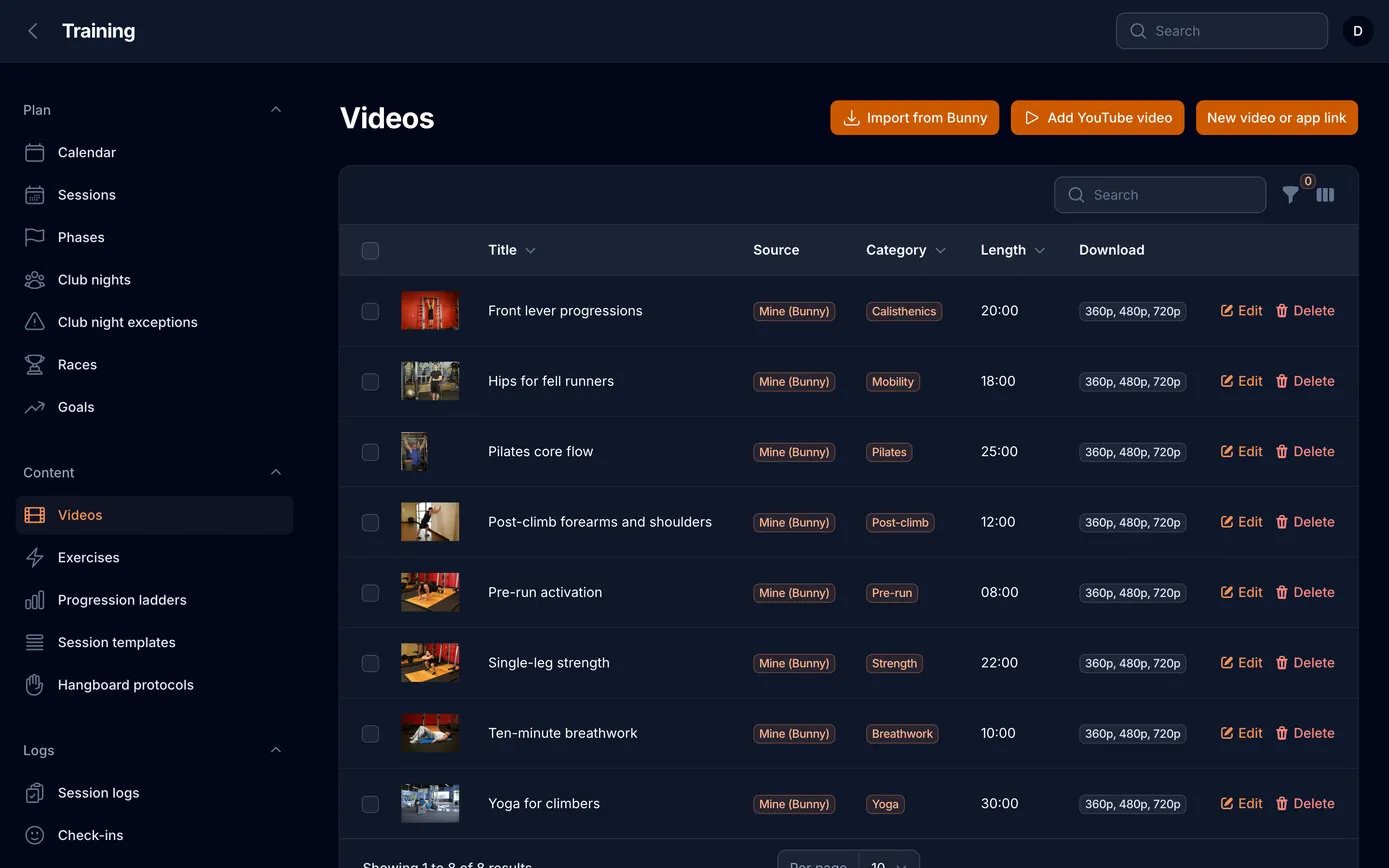
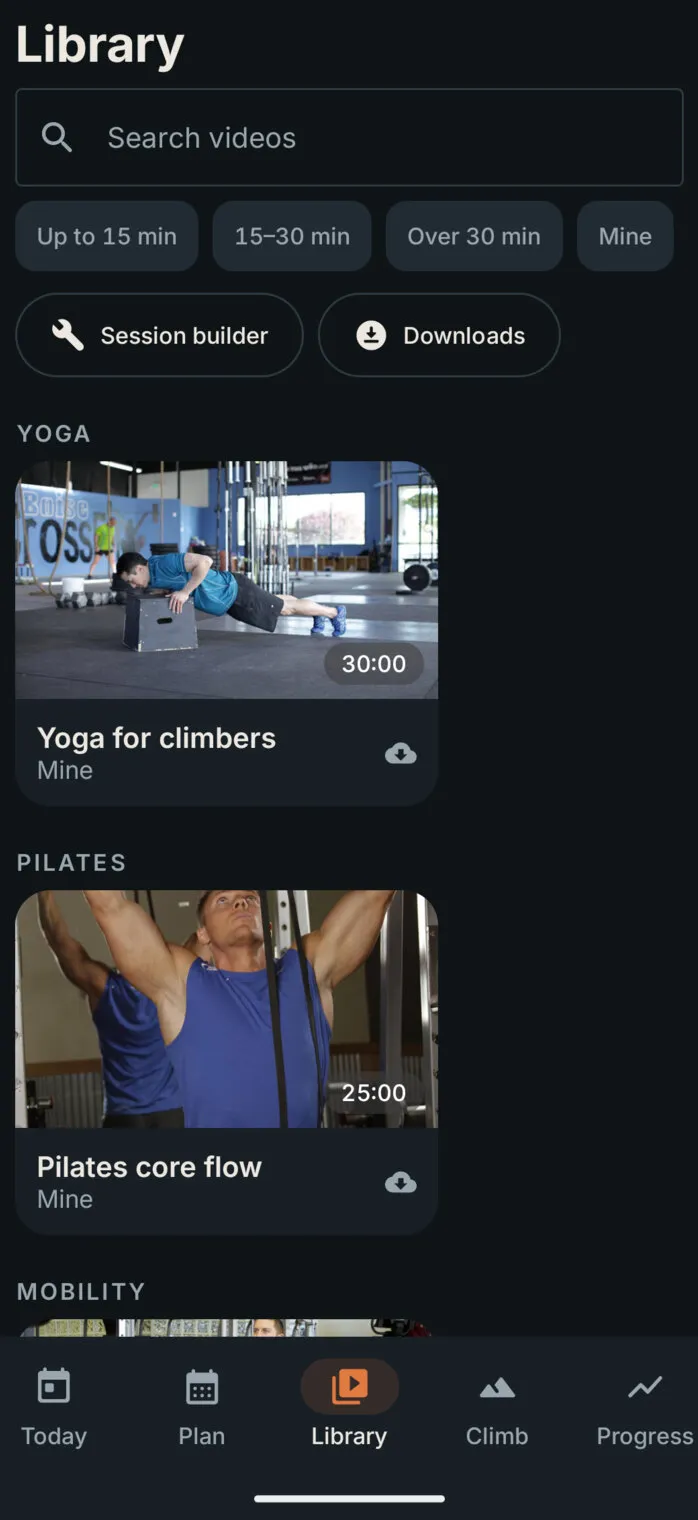
The video library on the web dashboard: each video with its thumbnail, title, category, length and the sizes that can be downloaded
The Library in the app: search, filters by length, the session builder and downloads, then videos grouped by yoga, Pilates and mobility, each with a download button

The library

Grouped by type and filtered by length, with a download button on every video. In the demo, exercise photos stand in for the videos’ own thumbnails.

  • Video
  • Offline
14

Climbing, progress and how it felt

After a key session the app asks how it went: effort out of ten, how the legs and energy feel, and any niggles. Those few taps are what the coach reads the next morning.

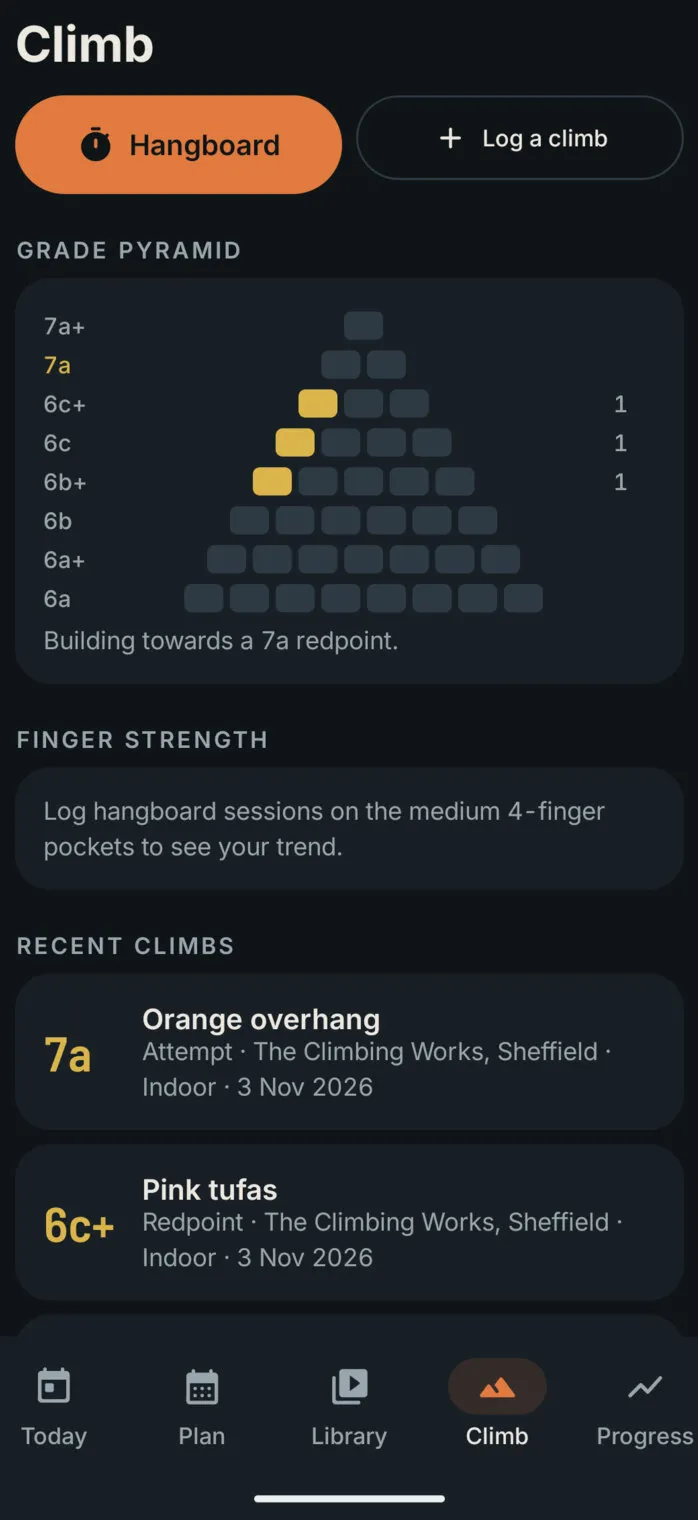
Climbs are logged with their grade and style, and build a grade pyramid towards the 7a. Each goal has its trend, and the progress page shows the weeks to go.

Check-in
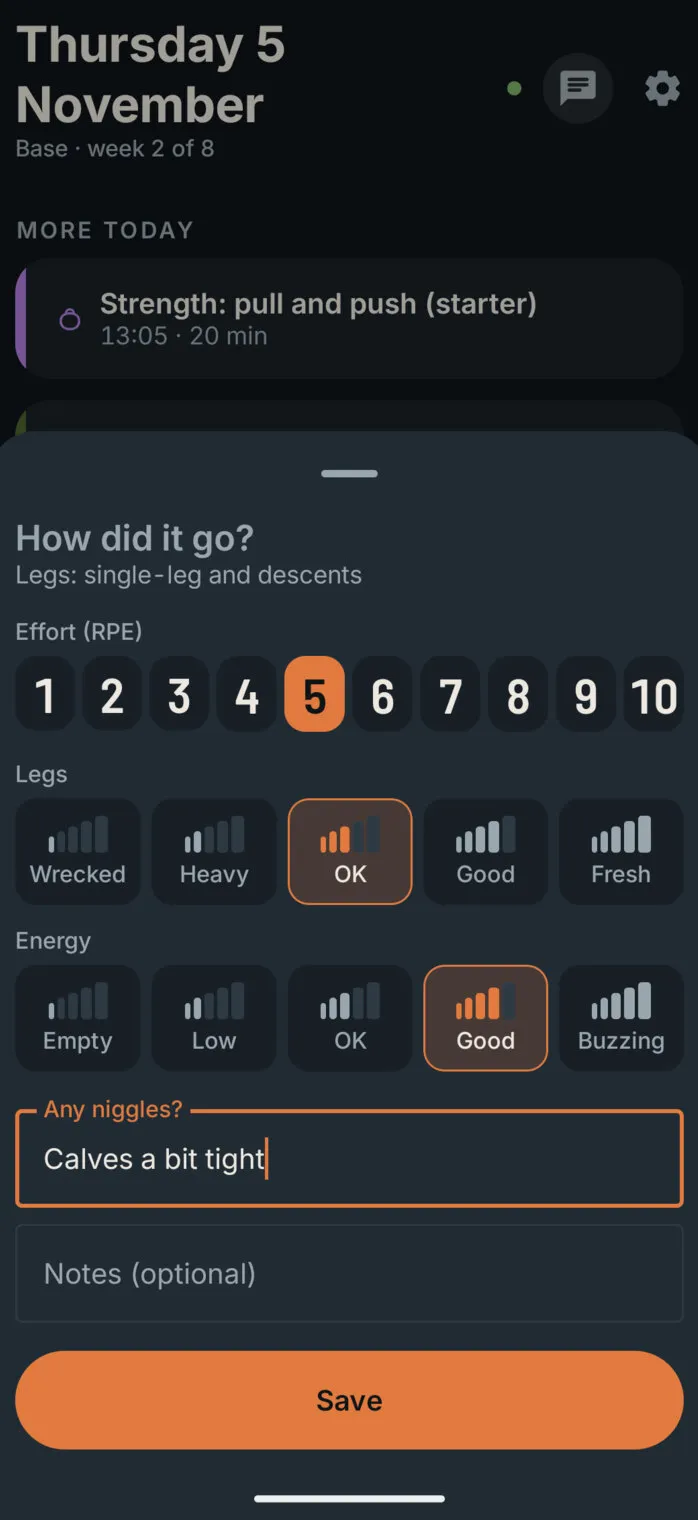
The check-in after a legs session: effort 5 out of 10, legs OK, energy good, and a niggle typed in: “Calves a bit tight”

Grade pyramid

The Climb screen: a Hangboard button, Log a climb, and a grade pyramid from 6a to 7a+ filling in with the climbs done, towards a 7a redpoint

Finger strength

Finger strength: 103% of bodyweight on the medium four-finger pockets, a line rising over the past weeks, then the recent climbs with their grades

The goals

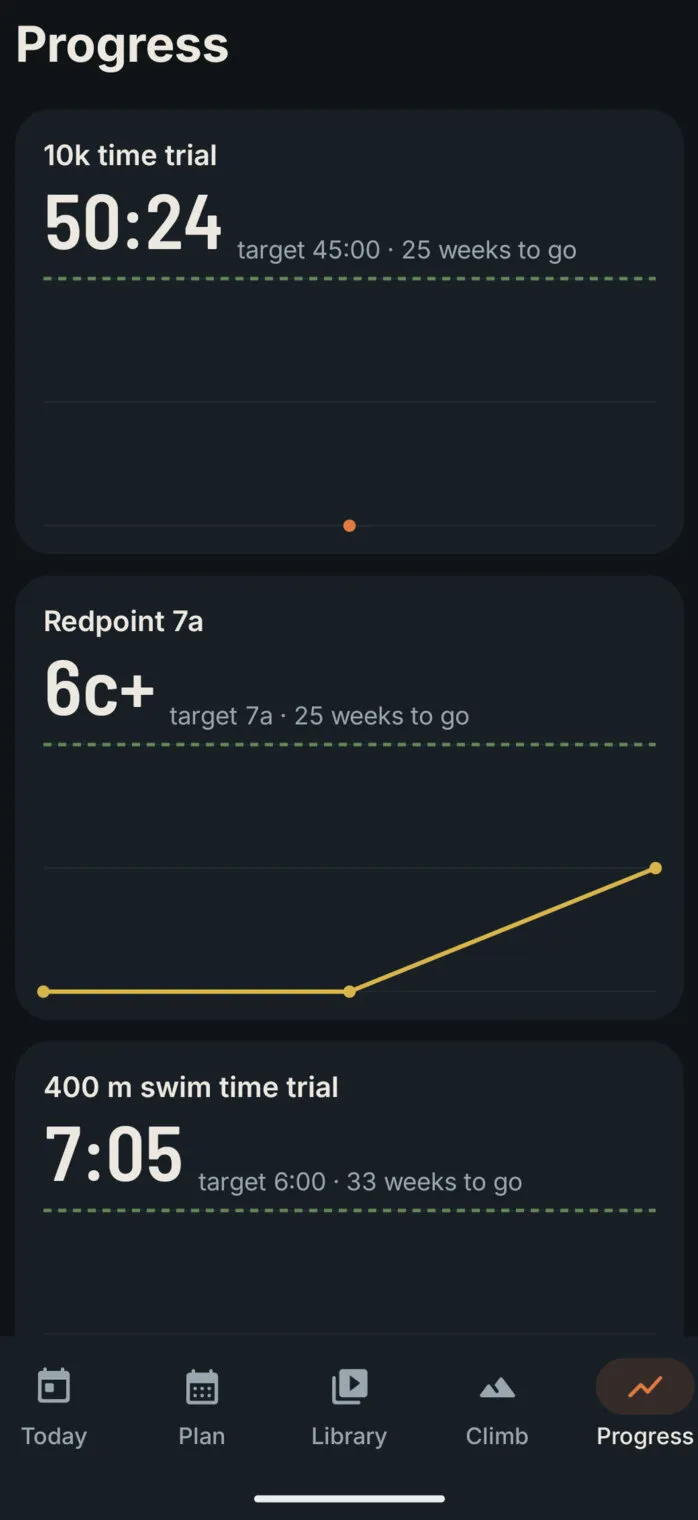
The Progress screen: the 10k time trial at 50:24 against a target of 45:00, the redpoint grade rising towards 7a, and the 400 m swim time
15

The web dashboard

Everything in the app can be seen and changed on a computer too. The dashboard opens on today, the week and the coach’s latest changes, with a row of lights showing whether each connection is working: the scheduled jobs, intervals.icu, the phone, the coach and the video library.

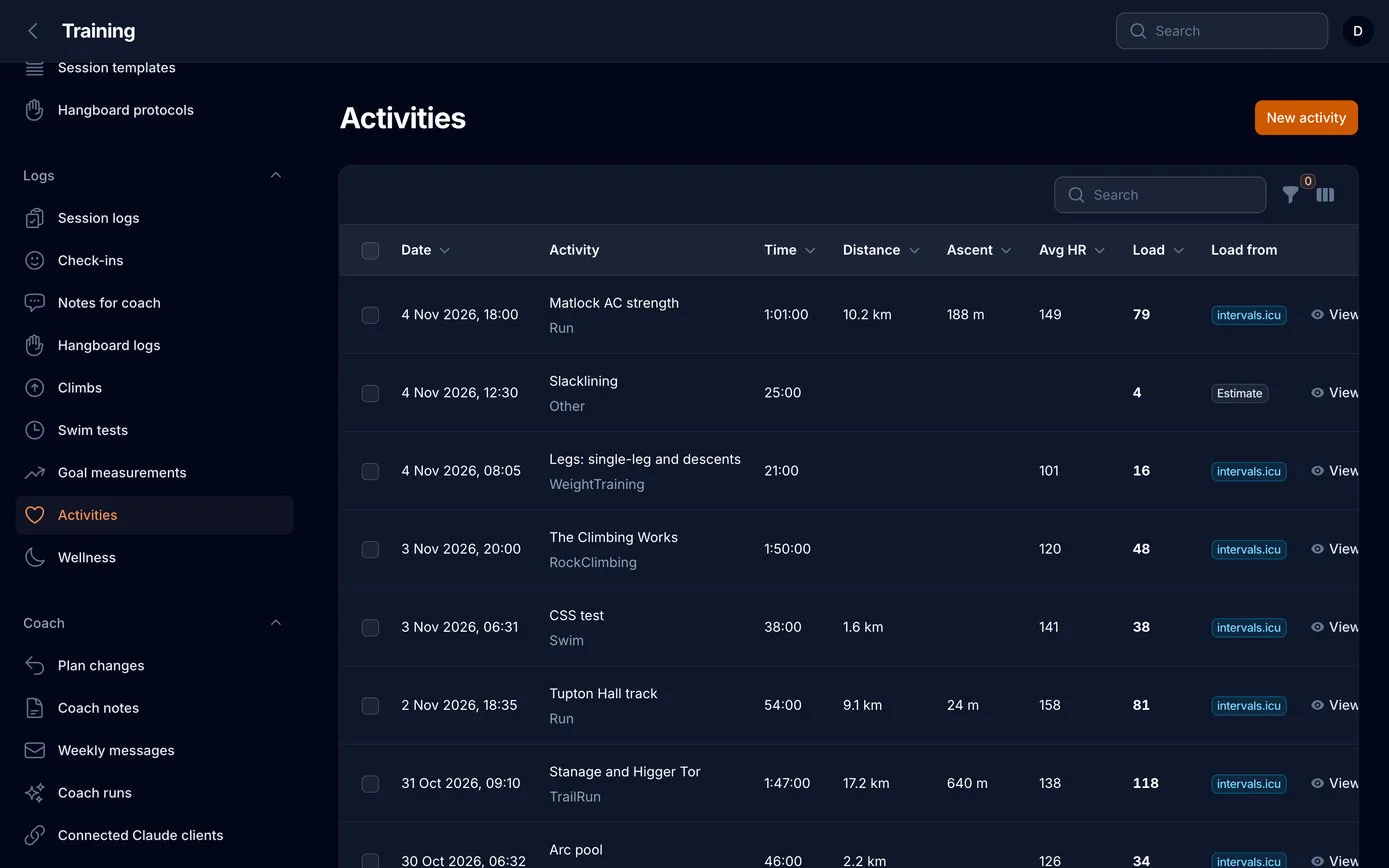
The dashboard has the same Fitness & freshness chart, from a month to all time, and the full list of activities with each one’s load score, sortable and filtered by sport and date.

Every session has a proper form, so a pool set or an interval session is edited as steps with targets, never as code. The calendar shows the week at a glance, and a page behind the login installs the latest app on the phone.
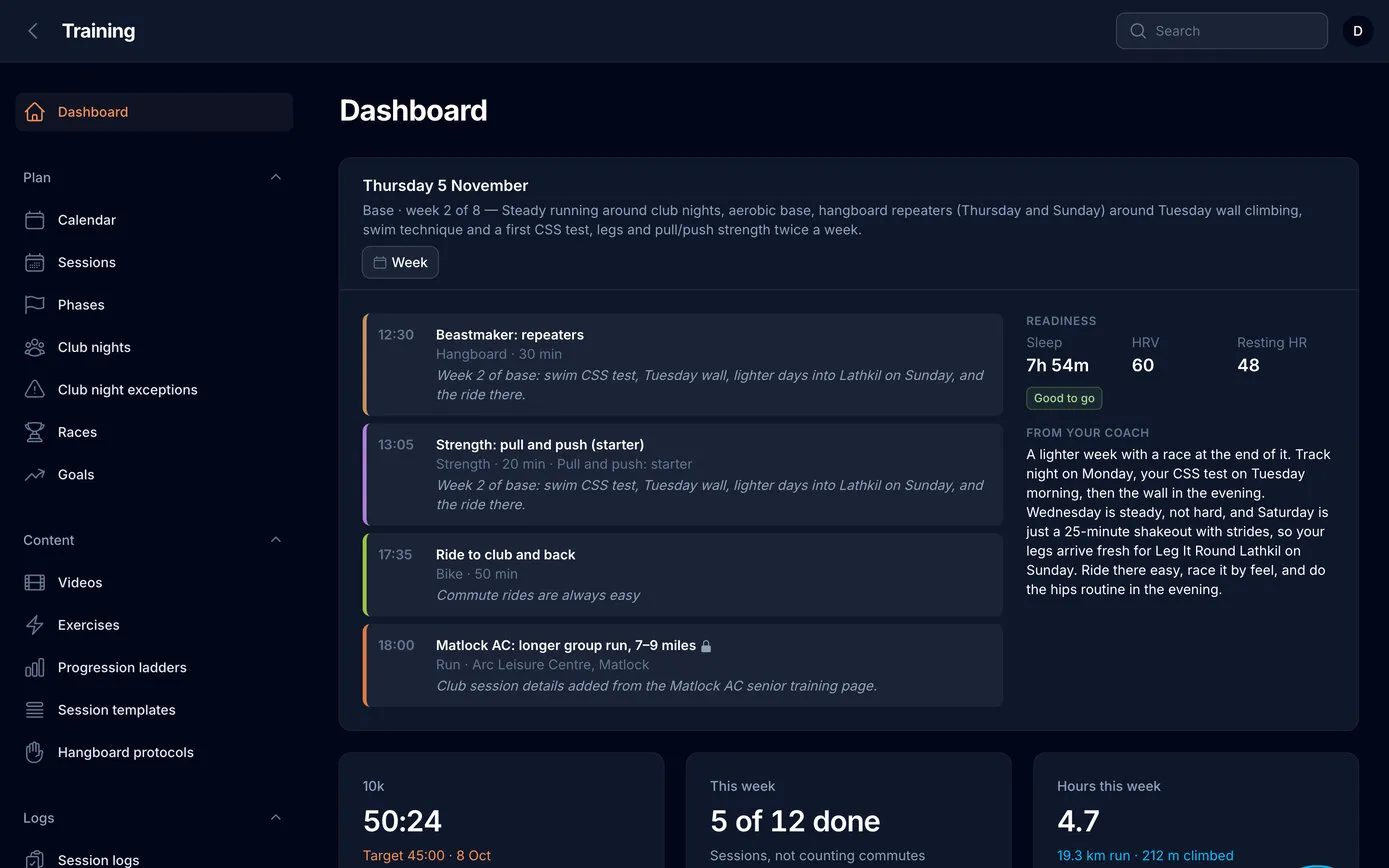
The web dashboard: Thursday 5 November, today’s four sessions as coloured cards, the readiness card and the coach’s message, then the 10k time, five of twelve sessions done this week, and hours this week
The Activities list on the web dashboard: date, activity and sport, time, distance, ascent, average heart rate, the load score and where it came from, newest first
The week of 2 November in the app: each day’s sessions with ticks on the ones done, and an Add button on each recent day

Every activity, on the web too

Sort by load to find the hardest sessions of the year, or filter to one sport and a date range.

  • Load scores
  • Filters
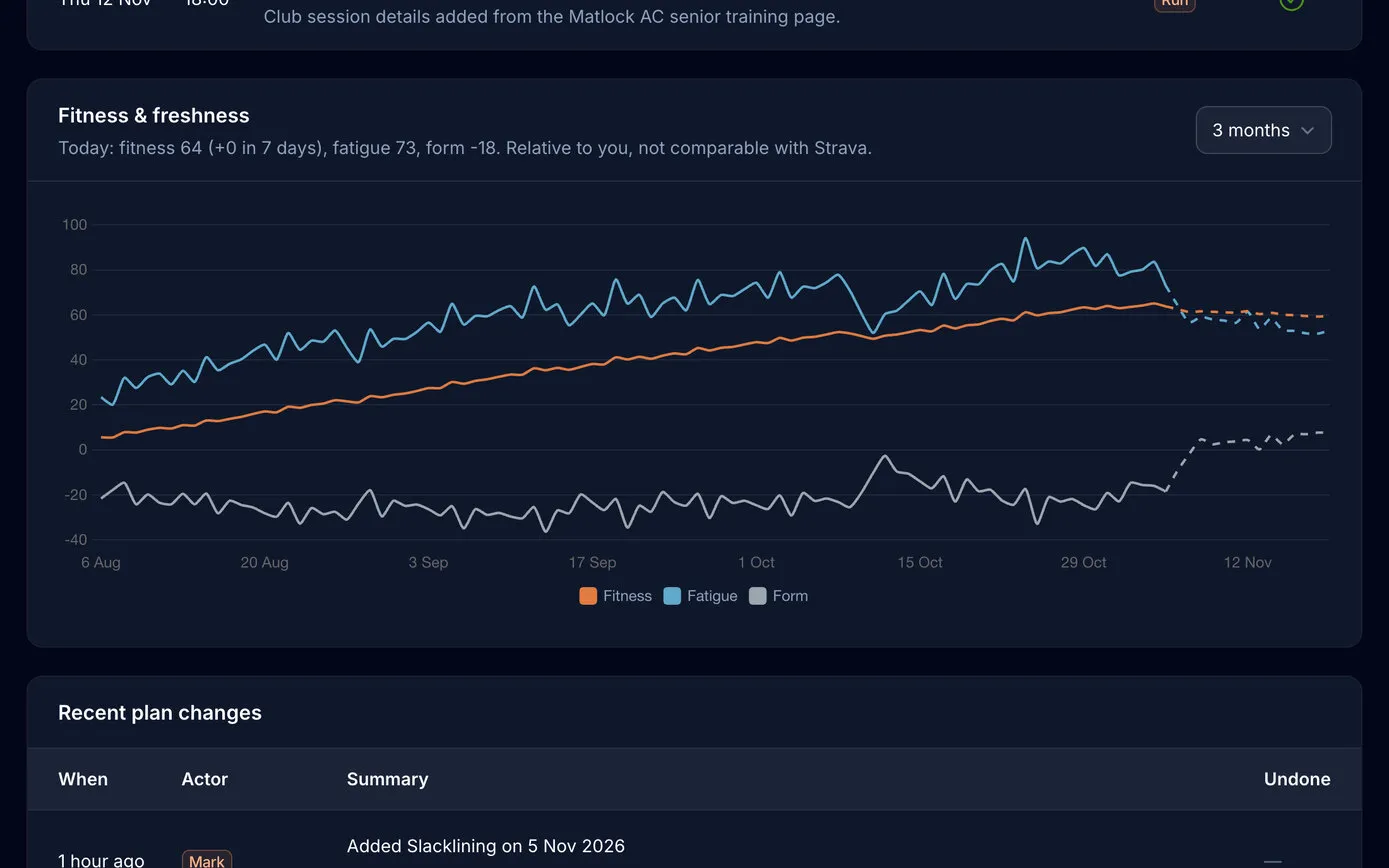
The Fitness & freshness chart on the web dashboard over three months: fitness rising steadily, fatigue above it, form below zero, and the plan’s next two weeks dashed, with today’s figures above the chart
  • Undo by batchEach coach run is one batch, so a whole evening’s planning can be undone in one click, or one change at a time.
  • Club nights by ruleThe club’s weekly runs are set as rules, with the first-Monday track night, and appear twelve weeks ahead.
  • Fell racesPeak District fixtures are fetched every week. Star one and it becomes a fixed race in the plan.
16

Built to be trusted

It’s a personal app holding personal data, so it was built with the same care as our client work:

  • Works with no signal. The phone keeps the whole plan and syncs when it’s back online; if a session changed in both places, the later change wins.
  • Private. One user, no sign-ups, every page behind a login and hidden from search engines. The coach signs in to its connector securely, and sees only training data.
  • Runs on its own. The server runs the syncs and the nightly jobs, and the coach’s checks are scheduled in Claude’s cloud, so it all keeps going with every computer switched off.
  • No AI keys on the phone. The coach runs in our own Claude account; the app and the server never call an AI themselves.
  • Other people’s content stays theirs. YouTube videos are embedded, never downloaded, and other apps’ routines open in their own app.
  • Tested. Automated tests for the timers, the session logic, the sync and the coach’s rules, run before every release.
  • Updates itself. The app checks the dashboard for a new signed release and offers to install it.

Results

A whole season planned day by day, from the first week of base training to Helvellyn in July 2027, with a coach that checks in every morning, explains every change and can always be undone.

The plan keeps up with real life: a short night, tight calves, a missed session or an unplanned afternoon on a slackline changes tomorrow, not the goal. And fitness, fatigue and form, worked out from every activity, show whether the training is working, at no monthly cost.

Built with

  • Kotlin and Jetpack Compose
  • Laravel and Filament
  • Claude, through its own connector
  • intervals.icu and Garmin
  • Bunny Stream
  • Offline video downloads
  • The impulse-response fitness model

Designed and built by us, with Claude as both the builder’s assistant and the coach.

NextCM ReviewsOur own Google reviews plugin: reviews collected every day and designed into the website.

Have a project in mind? We would like to hear about it.

  • Book a callThirty minutes on a video call, at a time that suits youBook a call
  • Phone07515 730686
  • Email
  • BasedMatlock, Derbyshire